

Zoo Tycoon (ZT1-Engine)
Port nativo de Zoo Tycoon (ZT1-Engine) para PC.
Zoo Tycoon (ZT1-Engine)
Port nativo basado en su ficha de origen.
README del repositorio
An open-source engine for Zoo Tycoon 1 on modern Windows: the original game, rebuilt to 2026 standards, for everyone to play, mod and improve.
Get it · What works · Modding · Contribute · Roadmap · Q & A · Forks
The ZT1-Engine main menu, drawn from your own copy of Zoo Tycoon.
Think of it as OpenRCT2 for Zoo Tycoon. The original game is the spec. Every rule (animal happiness, guest needs, the zoo rating, prices, research, escapes, predators) is recovered from the original zoo.exe and checked against it, not guessed. The game plays as it always did, only on today's PCs, at any window size, with bugs fixed and with optional extras you can switch on.
[!NOTE] You need your own copy of Zoo Tycoon. The engine ships none of the game's art, sound or files: it imports them from your install the first time it runs.
[!IMPORTANT] Status: alpha. The base game's freeform mode is playable and being polished against the original. A new alpha comes out every week. Expect rough edges, back up saves you care about, and please report anything that behaves differently from the original.
Why this exists
Zoo Tycoon 1's engine has no documentation, no source, no support from Microsoft and almost nobody left who knows how it works. It was built to run one game, in 2001, and it shows its age on modern Windows.
This project rebuilds that engine in the open so the game can live on. The goals are:
- Faithful. It does what the original does, measured against the original running side by side. Changing the original game is not the point.
- Better on today's PCs. Any resolution, a scaled UI, sharper drawing, fixes for old crashes and bugs.
- Optional extras, never forced. Everything beyond the original is a switch, and switched off you get the original's behaviour exactly.
- Open to everyone. The engine, the tools and the knowledge about the original are here for anyone to use, learn from, fork and build on. The aim is that nothing about how Zoo Tycoon works stays secret sauce.
- Friendly to new programmers and modders. Clear code, notes on where every rule came from, and tools that make reverse engineering and modding approachable for people who've never done it.
This is made out of love for the game. It isn't affiliated with Microsoft or Blue Fang Games.
Getting it
| Where | What |
|---|---|
| GitHub Releases | Every weekly alpha, with release notes |
| CodeRook | The same builds, as releases of the zt1-engine project (the game and the Lab update from there first) |
Both places get the same three files each week. Two of them play the game; the third is for looking inside it.
| Download | What it is |
|---|---|
ZT1-Engine-Setup-<version>.exe — 4 MB | The engine. Get this one. An installer, no admin prompt. Start ZT1-Engine and it finds your Zoo Tycoon by itself (or asks you once where it is), reads the game where it's installed without ever changing your game's folder, and offers each new alpha at the main menu. |
ZT1-Game-Build-<version>-win64.zip — 3 MB | The other way to play. A folder that runs on its own, like the first alpha: unzip it anywhere and run start.bat. The first time it copies your Zoo Tycoon's files in beside the engine, and for that it needs Python 3 installed. After that the folder plays by itself, but it doesn't update itself — download the next one when it's out. |
ZT1-Lab-Setup-<version>.exe — 570 MB | Not needed to play. The workbench the engine is developed with: it reads your own zoo.exe, shows what each address in it does, records which code runs in which situation, and edits and builds this engine's C++ beside it. |
Every download has its .sha256 beside it, so you can check what you got.
The ZT1 Lab, if you want it
The Lab is for anyone who wants to know how Zoo Tycoon and this engine actually work. Playing does not need it, and it is a 570 MB download — skip it unless that sentence describes you.
It installs the same way, for you alone with no admin prompt, and everything it needs is inside it: the decompiler (Ghidra) and the Java it runs on, an embeddable Python with the packages its tools use, and its knowledge base. There is nothing to install first. Like the engine, it ships none of the game's files — it reads your own copy where it is.
You can point it at the engine's source to edit and build, or let it use what it
carries. How it works: lab-app/README.md.
Each download's own README has the rest.
What you need
- Windows 10 or 11, 64-bit
- Zoo Tycoon 1. The base game is enough; the Complete Collection works too.
Linux / macOS: this repository focuses on the Windows build (see the Q & A and Forks & Related Projects below). For Linux or cross-platform work, see sharkwouter's zt1-engine, its openztc branch, or any of the community forks listed below.
What works now
The base game's freeform mode is the focus, and most of it works as in the original:
- Menus and screens: loading screen, main menu, freeform and scenario selection, credits, the in-game HUD and panels, tooltips, messages.
- Saving and loading: original
.zooimports, shared.zoosaves with a compatible world for the original and full engine state, engine-only.zt1savefiles, the original's file dialogs and Continue Saved Game. Exact original save-state parity remains incomplete. See the release notes. - Building: terraforming, paths, every fence type and gate, exhibits, scenery, foliage, rocks, buildings and shops, shelters and toys; the bulldozer and undo.
- Animals: adopting and selling, the original's behaviours and animations, eating, drinking, sleeping, swimming, exhibit suitability and happiness worked out as
zoo.exedoes, breeding, illness, old age. - Escapes and predators: jumpers jump, climbers climb, bashers break fences. Loose meat-eaters chase guests and keepers dart and crate them. Predators hunt their prey in exhibits.
- Guests: arriving by the zoo's rating, needs, shops, tours, donations, thoughts, litter, fleeing.
- Staff: zookeepers, maintenance workers and tour guides, with hiring, firing and duties.
- The zoo's business: zoo rating, admissions, marketing, finances, graphs, research and conservation, freeform goals and awards.
- Sound: music, ambience, crowds, guests, animals and buildings.
Marine Mania (Complete Collection) is in: tanks, marine animals, tank filters, Marine Specialists who climb in, feed and clean underwater as in the original, and scheduled animal shows with their tricks, audiences and income. Dinosaur Digs has started: dinosaurs, eggs and DRT capture work, and the rest is still being checked against the original.
Graphics and Game Options
Game Options is a window with every setting, opened from the in-game disk button or the main menu. Each page is one list you scroll, with the setting under the mouse explained at its foot. Switch it off (Controls › Game Options) to get the original's side panel back.
- Display: window, borderless or full screen at any resolution, a frame rate limit, vertical sync and brightness.
- Interface size: menus and panels scaled to suit a big screen, from 0.5x up.
- Art upscaling: how the 2001 art looks when drawn bigger: FSR (AMD's upscaler, on the graphics card), Stylized, Sharp, Smooth or MMPX pixel-art scaling, with an Art Sharpness slider.
- Effects: anti-aliasing (FXAA), bloom, a tilt-shift miniature look, contrast and vibrance, a vignette and film grain. They apply to the zoo only, never the menus, and all are off unless you pick them.
- Day and night: an optional twelve-minute day with sunrise and sunset, sun shadows in each object's real shape, and buildings, lamps, signs and fires that light up at night.
- Game speed: an optional button beside Pause for normal, 2x and 5x speed. While it or day and night is on, a 24-hour clock shows beside the date.
- Accessibility: colour-blind filters and a bigger mouse pointer.
- HD art (optional mods): zoomed in, the map's art can be drawn from much bigger HD pictures. See Modding.
The game draws with Direct3D 11 by default, which is the fastest on Windows, and switches to OpenGL when a setting needs its shaders.
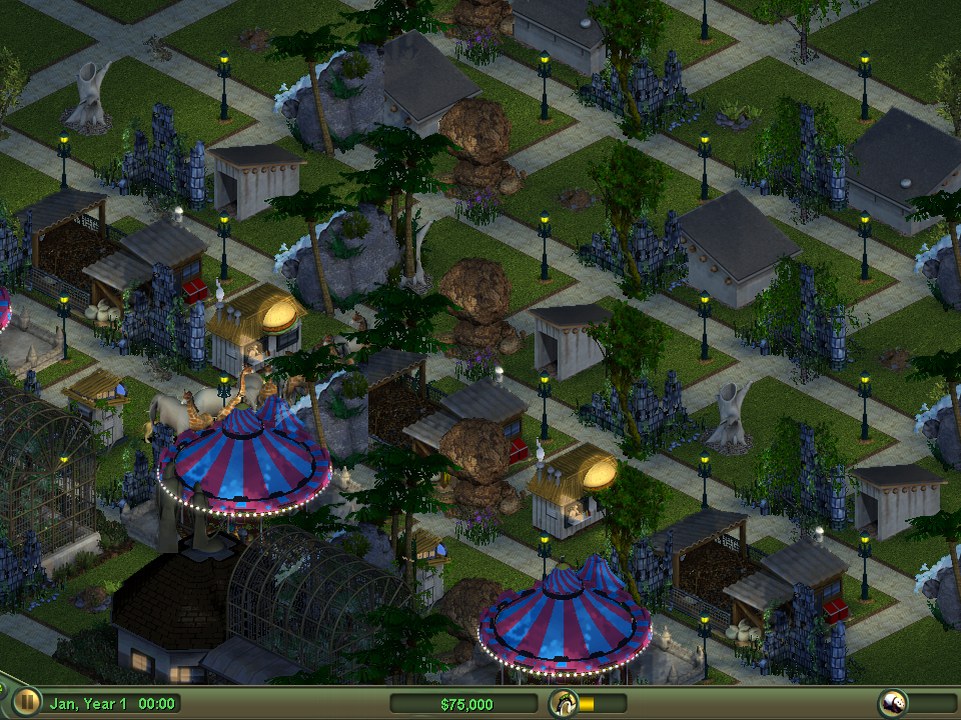 | 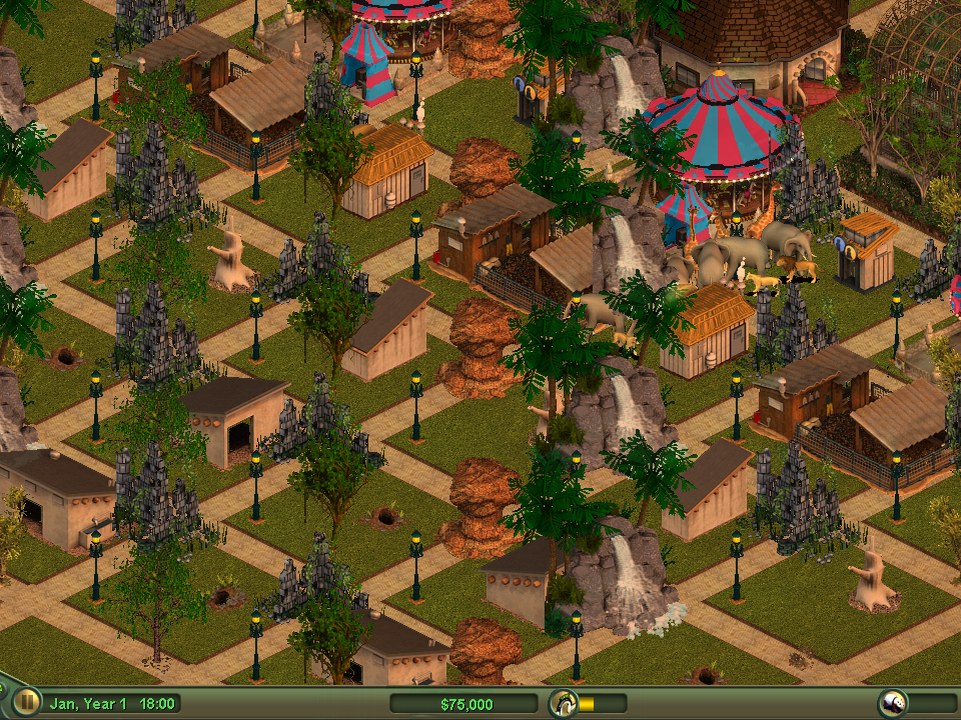 |
| Day and night: lamps, windows, signs and bulbs light the zoo after dark, with a 24-hour clock beside the date | Sun shadows in each object's real shape, long and warm towards sunset |
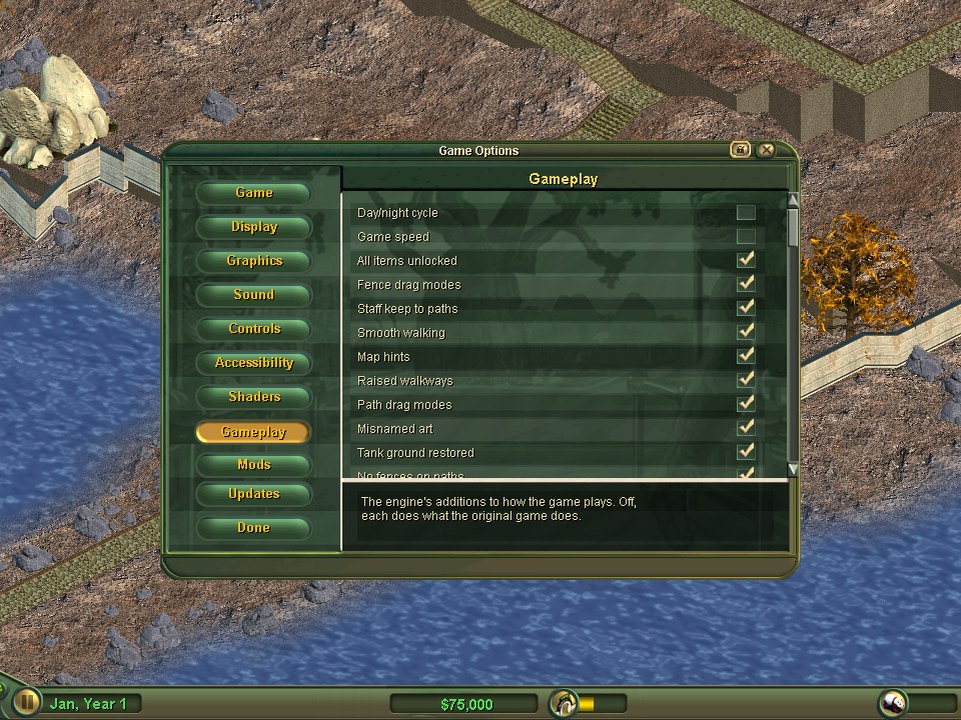 | 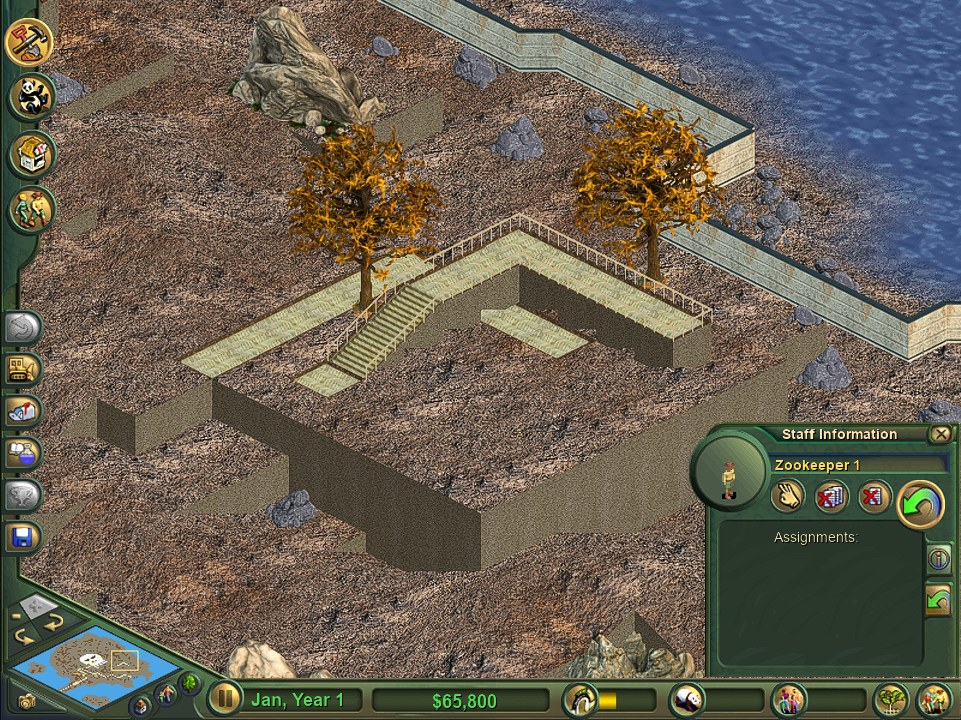 |
| Game Options: every setting in one window, the engine's additions each a switch | Raised walkways, an optional extra |
Optional extras
Each is a switch; off means the original's behaviour. They're on the Gameplay, Controls, Graphics and Mods pages of Game Options (or in the dev console: features, set <name> on|off). Among them:
| Switch | What it does |
|---|---|
allUnlocked | every item available in freeform from day one |
fenceModes / pathModes | fence and path drags that can bend; Tab cycles the shape |
elevatedPaths | raised walkways and stairs, from the original's path art |
staffPaths / smoothRoutes | staff keep to paths; walkers take straighter routes |
mapTooltips | hints over the map, not only on buttons |
hotkeys | Esc / right-click put tools away, Ctrl+Z undoes, Q/E rotate, F11 full screen |
daynight | the day and night cycle and its lighting |
fastforward | the game speed button (with day and night, it brings the 24-hour clock) |
dragwindows / smartstack | drag any window by its title; windows step aside instead of covering each other |
tankclip / tankgroundback / nofenceonpath | tank animals cut off at the glass; the ground put back when a tank goes; no fences across paths |
mods / modmenu / custommaps | load mods; the Mod Menu; freeform maps made in the Lab |
infinitemoney | a cheat: buy anything, whatever your cash |
Modding
Mods use the game's own kind of files. A mod is a folder in mods/ with a mod.json (name, author, version, about, replaces) and .ztd archives holding files under their game paths. They take the place of the originals while switched on, the same way the original game's own patches work. The full guide is docs/MODDING.md.
- The Mod Menu turns your mods on and off, shows each one's details and pictures, and browses the mod repository: mods other players have uploaded, checked (the rules and a virus scan) and ready to download in the game. Big mods download in parts, so a dropped connection only costs one part.
- Old Zoo Tycoon downloads (
.ztdfiles from fan sites) can be added straight from the Mod Menu. - Mods can have settings, shown on their own page in Game Options › Mods.
- Shader mods bring their own looks: art shaders for the map's art and screen shaders for the whole picture. The bundled Toon mod is one.
- HD art mods replace the map's art with pictures four times the size, used when you zoom in. There are three, one each for Zoo Tycoon, Marine Mania and Dinosaur Digs, arriving in the repository part by part. Their art is the game's own, enlarged on the author's PC by Real-ESRGAN, an open-source upscaler; that's why they carry the AI tag. An HD art mod adds a Graphics card memory setting: kept compressed (the default), its pictures take a quarter of the graphics card's memory.
- The ZT1 Lab makes mods without code: new animals from your own art, buildings, scenery, fences, staff and guest looks, freeform maps, theme packs and HD art, then checks and uploads them to the repository.
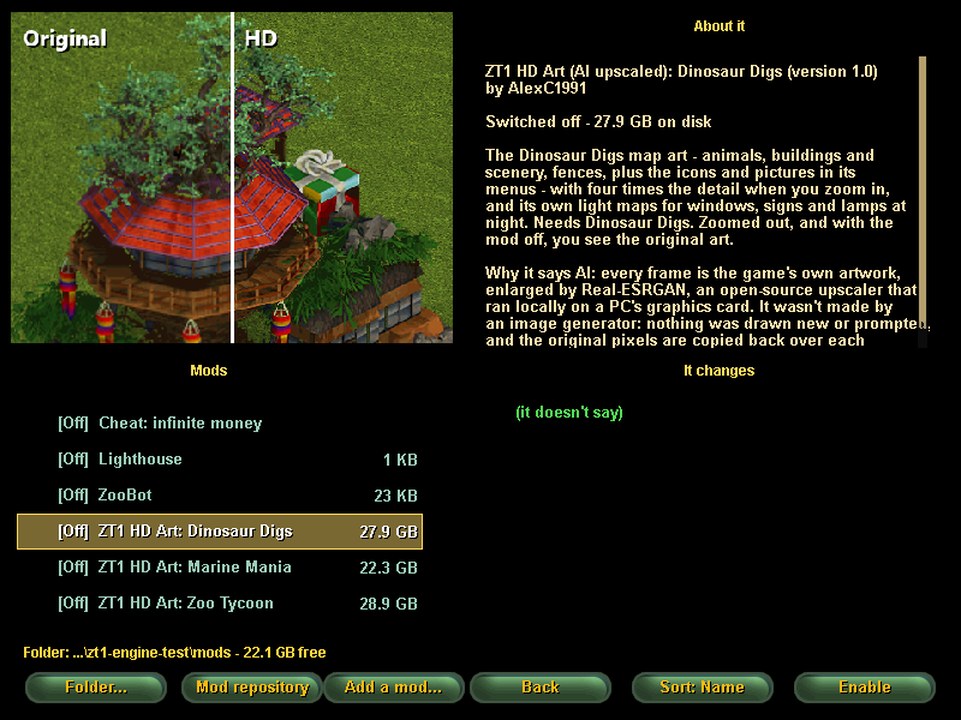 | 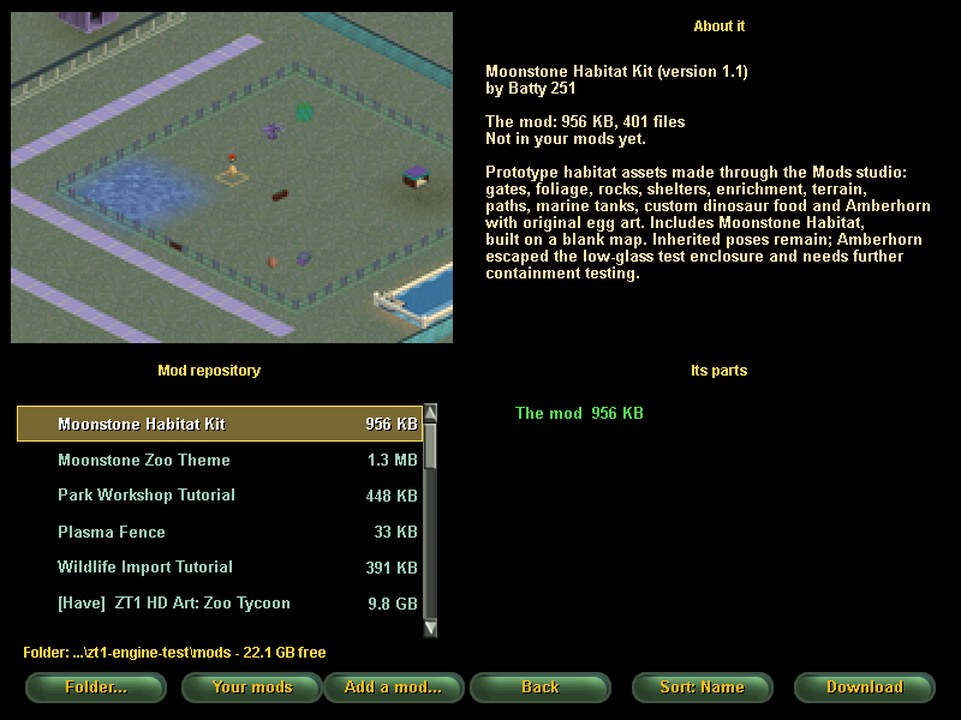 |
| The Mod Menu: your mods with their pictures and sizes, sorting, and the mods folder on any drive | The mod repository: checked mods to download in the game |
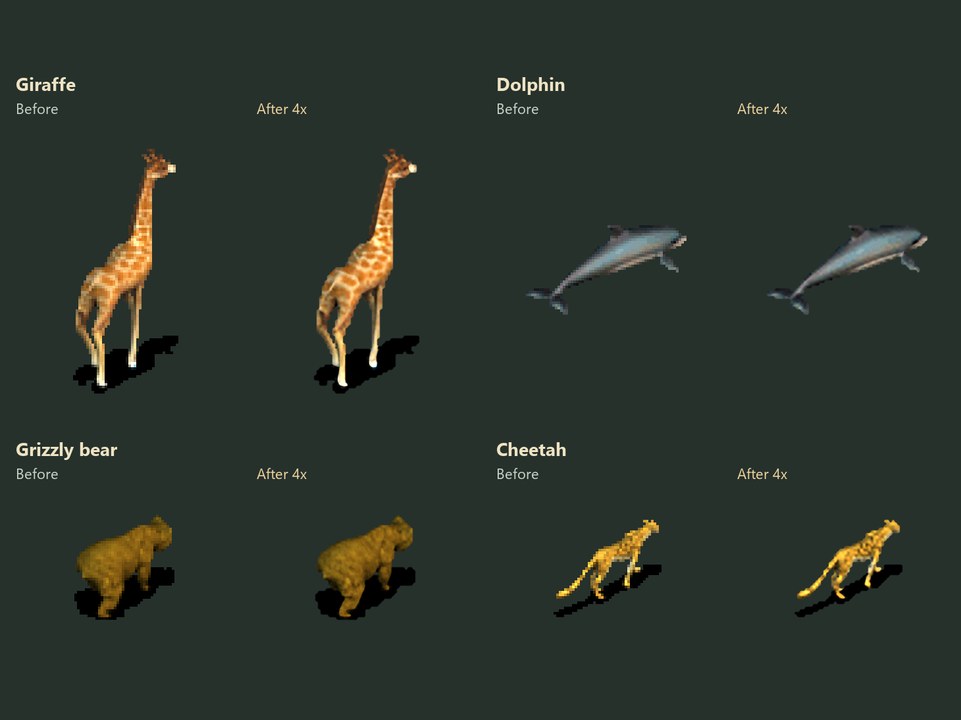 | 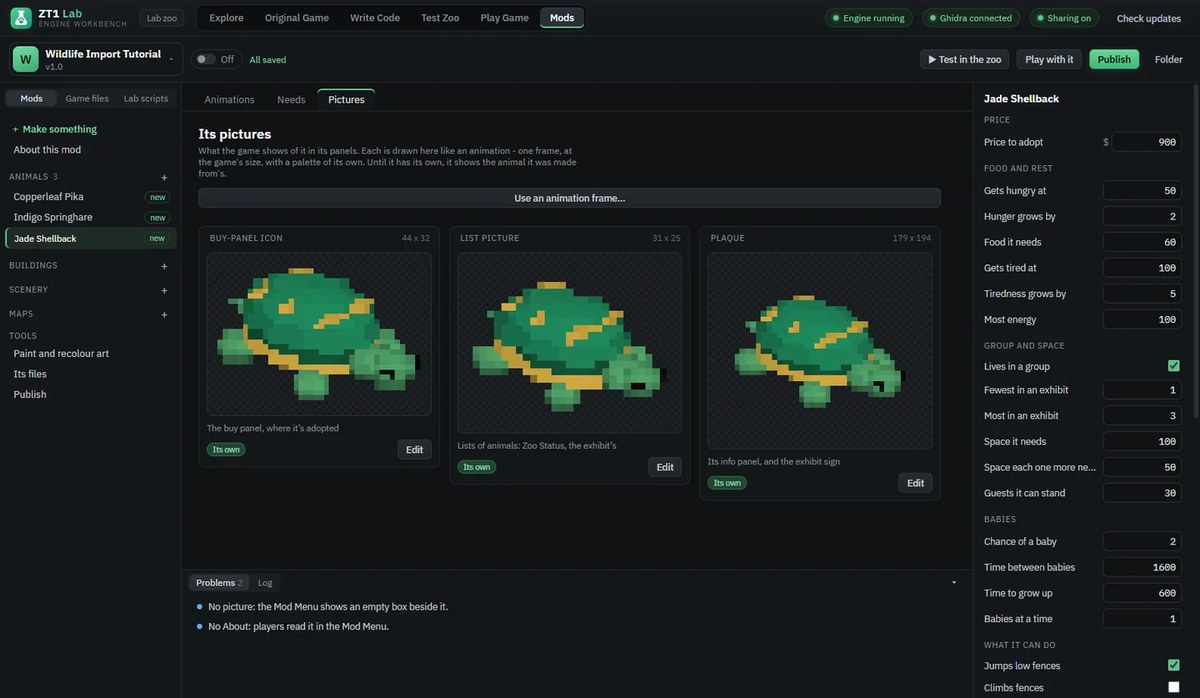 |
| HD art mods: the game's own art at four times the detail | The ZT1 Lab: a new animal made from your own art, with its values |
Tools for contributors: the ZT1 Lab, and AI agents
The ZT1 Lab (lab-app/) is the workbench this engine is built with, and it's yours to use too. It's a desktop app that puts everything in one place:
- the original's code, through Ghidra;
- the game's files;
- our engine's code, with a build button;
- a test zoo where you can step through the engine's logic live;
- the original game running alongside, for recording what it does.
Its Explore view answers "where is X in the original, and do we have it yet?". See lab-app/README.md.
The Test Zoo: the engine running inside the Lab, here with a custom animal, its needs shown live in the Inspector.
Use it with your own AI agent. The Lab comes with an MCP server (lab-app/mcp/server.js), so any agent that speaks MCP can drive the Lab: Claude Code, Codex, Cursor, VS Code / Copilot, Gemini CLI, and others. That covers searching the original's functions, reading their code, editing and building the engine, placing things in the test zoo and reading what happened.
- It runs on your own PC only (it talks to the Lab on 127.0.0.1).
- Everything it does happens visibly in the Lab's window.
Claude Code picks it up from this repo's .mcp.json by itself. Other agents need one entry in their MCP settings:
{ "mcpServers": { "zt1-lab": { "command": "node", "args": ["lab-app/mcp/server.js"] } } }
(Use the full path to server.js if your agent doesn't start in the repo's folder.) Start the Lab first, with lab-app/ZT1 Lab.cmd.
Using an agent is entirely optional. Everything it can do, you can do by hand in the Lab.
Contributing
Everyone is welcome: players reporting bugs, modders, and programmers of any level. See CONTRIBUTING.md for how to build, how the code is laid out, and the one big rule: the original game is the spec.
The most useful thing anyone can do is report a difference from the original: what you did, what the original does, what the engine does, with screenshots or a saved zoo.
You're also free to fork it and take it your own way. That's what open source is for.
Roadmap
- Base Zoo Tycoon freeform, one to one with the original. Every system checked against
zoo.exe, function by function. An options menu for the extras, and a friendlier mod menu(done: the Game Options window, the Mod Menu and the mod repository).- Scenarios: every scenario's goals and events.
- Marine Mania and Dinosaur Digs: tanks, marine animals, specialists, scheduled shows, dinosaur eggs and DRT capture are implemented; wider expansion parity remains in progress.
- The original's
.zoosaves: imports and shared original-compatible export are implemented. Exact AI/task continuation and remaining state conversion still need work. - Graphics for today's PCs, always optional: more of what a modern game's graphics page offers, such as smoother zoomed-out art and ambient occlusion, each one a switch that's off unless you pick it.
How it's made (and AI)
The original's rules are recovered by reading zoo.exe's machine code (in Ghidra) and by watching the original run side by side with this engine. That's slow, detailed work. AI tools are part of the toolset alongside Ghidra and the ZT1 Lab, above all for reading and decoding the original binary, and as a coding assistant.
- There's no AI-generated content in the game. No AI art, audio or text: everything you see and hear comes from your own copy of Zoo Tycoon. The optional HD art mods are separate downloads; their pictures are the game's own art enlarged by an open-source upscaler, not made by an image generator.
- Every rule is traceable. The code comments cite the address in
zoo.exeeach rule was copied from, or say it was measured from the original, or mark it as our own. Anyone can check the work.
For a one-person project, that's what makes an engine like this possible. You're free to contribute with whatever tools you like, or to fork and do it your way.
Q & A
Playing
Do I need to own Zoo Tycoon? Yes. The engine ships none of the game's art, sound or files. It reads them from your own installed copy, the first time it runs.
Is the base game enough, or do I need the Complete Collection? The base game is enough. The Complete Collection adds Marine Mania's animals, tanks and shows, along with Dinosaur Digs animals, eggs and DRT capture. These expansion systems are still being polished.
Which download do I want?
Almost everyone wants ZT1-Engine-Setup. It's small, needs no admin rights, finds your game by itself and offers each new alpha at the main menu. ZT1-Game-Build is the same game as a folder you unzip and run with start.bat. It needs Python 3 the first time and doesn't update itself. ZT1-Lab-Setup is 570 MB and is only for people who want to look inside zoo.exe. You don't need it to play.
Will it change my Zoo Tycoon install? No. The installer version reads your game where it is and never writes to that folder.
Will it run well on my PC? It's made for Windows 10 and 11 on ordinary PCs. Everything beyond the original look (effects, day and night, HD art) is off unless you switch it on, and each setting in Game Options says what it does. The HD art mods are the heaviest: they need more memory, and their Graphics card memory setting keeps that down.
Can I load my old saves, or play scenarios?
Original .zoo saves can be imported. New shared .zoo saves contain a compatible stock world for the original game and the full engine state in the same file; engine-only .zt1save files remain available. Compatibility is incomplete, especially exact AI/task continuation and scenarios. Resaving in the original removes engine-only data from that copy, so keep a separate engine copy and older backups.
Something behaves differently from the original. Where do I report it? Open an issue. Say what you did, what the original does and what the engine does. A screenshot or a saved zoo helps a lot. These reports are the most useful thing anyone can send me.
Linux, macOS, forks and pull requests
Is there a Linux or macOS version? Not from me. I'm putting all my effort into the Windows build until it's fully built out, and I have no plans for a Linux or macOS one. Other people are working on those, and they're listed in Community Forks & Related Projects below.
Do you accept pull requests?
Yes, for things like bug fixes, accuracy fixes where you can point to zoo.exe or a measurement, formula checks and docs. Please keep each one small and focused.
Then why won't you merge a Linux or macOS port, or another big piece of work? It's not a question of quality. If I merge a big piece of work and the person who wrote it later moves on, I'm left maintaining code I didn't write and often can't test. That's too much for a one-person project. So for anything large, please fork the repo and keep it as your own project. You stay in charge of it and nothing depends on me.
What happens if I fork it? That's welcome, and the MIT license allows it. If you tell me about your fork, I'll add it to the list below and send people your way. It doesn't matter what system it runs on or how many forks there end up being. If there are five Mac builds, I'll list all five.
Is there a Discord or chat server? No. I don't want to host or moderate one, because then the project would depend on me being around to run it. Everything happens in the open here, in issues and pull requests.
Reverse engineering and modding
How do I share what I find in zoo.exe? Do I have to use the ZT1 Lab?
No. You can stay in Ghidra and your own workflow. The shared knowledge base is a plain web service. You pull from it and send to it over HTTPS, with no account and no token. The ZT1 Lab can do it for you through its MCP tool, but nothing requires the Lab. If you'd rather not touch it, open an issue with what you found and I'll add it. The details are in re/cloud/README.md.
Why does the knowledge base care which zoo.exe I have?
Every finding in it is an address, and an address is only true of one exact file. The base is for one build of zoo.exe: 2,449,432 bytes, SHA-256 starting 61fcc6d1. It refuses contributions from any other file, because the addresses would land on the wrong functions and spoil it for everyone. Check your own file's size and hash first. If they match, your findings can go straight in.
I have findings from a different build, such as the Mac version. Are they useless? No. Addresses from another build can't go in as they are, but class and struct names are stored by name, not by address. Those can be matched up to this build and are very welcome. Open an issue and tell me what you have.
Can I trust what's in the knowledge base? Treat it as checked work, not as gospel. A new finding stays provisional until I've reviewed it. Observations of what ran in which situation are published straight away and marked unverified. Every rule in the engine cites the address or measurement it came from, so you can check it yourself.
Can I make mods?
Yes. A mod is a folder in mods/ with a mod.json and .ztd archives that replace the originals while it's switched on, the same way the game's own patches work. There's more in the Modding section above.
The project
Is AI used to make the game?
Nothing in the game is AI-generated: no art, audio or text. Everything you see and hear comes from your own copy of Zoo Tycoon. The optional HD art mods, which you download separately, are the game's own art enlarged by Real-ESRGAN, an open-source upscaler. AI tools are part of how the engine is built, mainly for reading and decoding zoo.exe alongside Ghidra, and as a coding assistant. Every rule still cites where it came from, so the work can be checked. You're free to use whatever tools you like when you contribute.
Is this affiliated with Microsoft or Blue Fang? No. It's a hobby project made out of love for the game.
Community Forks & Related Projects
Building your own fork, or something related to Zoo Tycoon, on any system? Open an issue with a link and a line about what it is, and I'll add it here.
| Project | System | What it is |
|---|---|---|
| sharkwouter/zt1-engine | Linux | The original zt1-engine by Wouter Wijsman, which this project grew from |
sharkwouter/zt1-engine, openztc branch | Cross-platform | A separate cross-platform line, developed independently |
StevenGann/zt1-engine, linux-port | Linux | A Linux port of this engine |
| RustyZoo | Windows, macOS, Linux | A separate reimplementation written from scratch in Rust (GPL-3.0), loading your own game's data |
Credits
- Wouter (sharkwouter) Wijsman started zt1-engine. This project grew from his work, and he continues the Linux side in his repository.
- batty251 (AlexC1991 on GitHub): the Windows engine, reverse engineering and maintenance.
- Everyone who contributes, tests and reports bugs.
- Zoo Tycoon was made by Blue Fang Games and published by Microsoft. This project isn't affiliated with either.
The icon is from a picture by Magda Ehlers on Pexels.
License
MIT: see LICENSE.txt. Third-party libraries (SDL2, SDL2_image, SDL2_mixer, SDL2_ttf, FreeType, pe-resource-loader, libzip, zlib) keep their own licenses: see THIRD_PARTY_LICENSES.md.
Comentarios (0)
Inicia sesión para dejar un comentario.
Sé el primero en comentar sobre este juego.