V2000 (OpenV2K)
Port nativo de V2000 (OpenV2K) para PC.
V2000 (OpenV2K)
Port nativo basado en su ficha de origen.
README del repositorio
OpenV2K
OpenV2K is an open-source Rust reimplementation of V2000 (Frontier Developments, 1998), rebuilt from reverse engineering of the original executable, its data formats, and observed retail runtime behavior.
Unofficial fan project. OpenV2K is not affiliated with, endorsed by, or connected to Frontier Developments. "V2000" and related names belong to their respective owners. You need an original copy of V2000 to play. This repository and its releases contain no original game data, executables, videos, or music. The game loads those from your own installation, and the launcher verifies them against known retail checksums.
Status
The whole campaign plays, from Level 1 to the Queen and the closing scene.
That includes the retail frontend (intro, menu ring, New Game / Load /
settings, the attract demo), native save loading, campaign checkpoints and the
cheats. Every map-placed actor in the 36 campaign worlds runs its recovered
retail behavior. Pieces that are not proven yet stop with a logged message
instead of guessing; the largest are the Possession Ray's takeover and its
MindBall. Network play, retail's deathmatch for up to eight players, runs
between port machines over the port's own transport; its held parts are in
docs/re/MULTIPLAYER.md.
docs/re/PORT_FIDELITY_GAPS.md and
WATER_WORLD_TODO.md track known gaps.

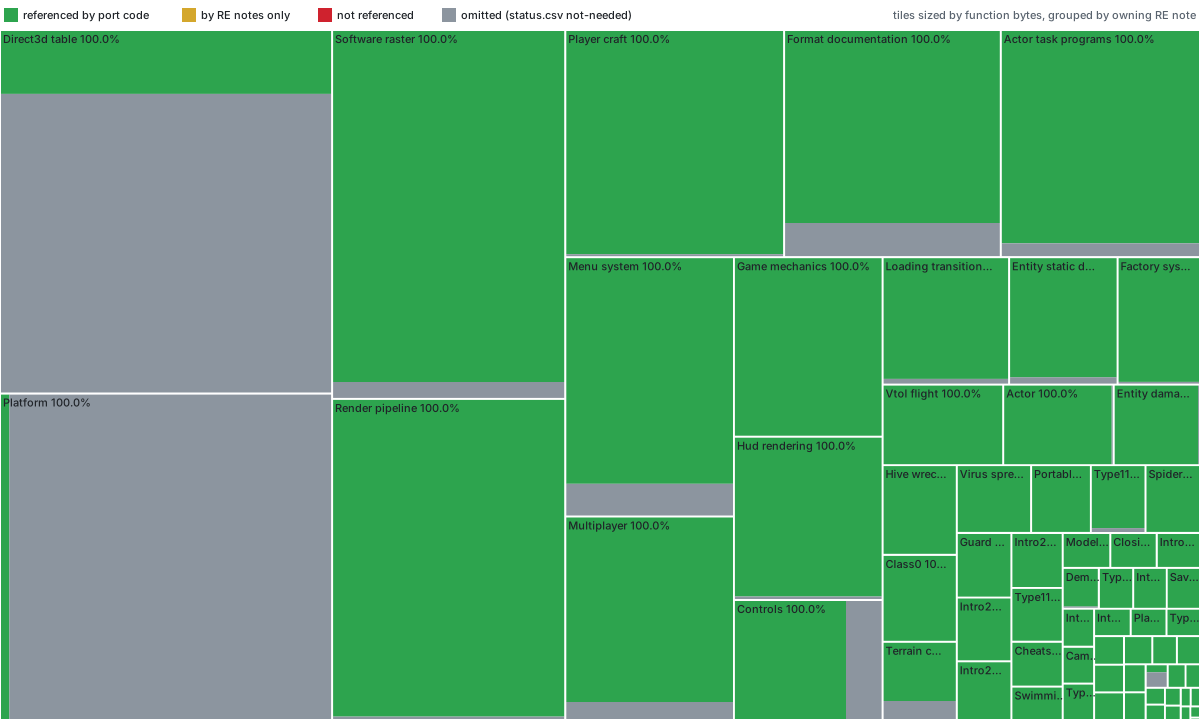
Of the 1,761 game functions in retail V2000.EXE the port
covers (642 omitted),
1,761 (100.0%) are referenced by the port's code and
1,761 (100.0%) by its code or RE notes.
How this is measured.
Playing
Each release has Windows and Linux (x86-64) builds.
Windows
- Download and extract the
windows-x64zip. - Run
OpenV2K.exe. If its folder doesn't already contain V2000 data, the pre-game launcher can do one of two things. It can place the executable into an existing V2000 installation, or it can install the data and music from your BIN/CUE or ISO disc image. - Press Play.
Releases are unsigned, so Windows SmartScreen may warn on first launch.
Linux
Run ./openv2k for the launcher: choose an existing V2000 installation with
Change..., or Install from disc image..., then press Play. Options
offers the same rows as on Windows. The command line works without it:
tar -xzf OpenV2K-*-linux-x64.tar.gz && cd OpenV2K-*-linux-x64
./openv2k                                      # the launcher
./openv2k --data-dir /path/to/V2000            # play an existing installation directly
./openv2k install --image V2000.bin --destination ~/V2000   # or install from disc
SDL2 is built into the binary. Windows is the primary platform; Linux builds are newer and less tested.
Controllers
Plug in a game controller at any time; the game follows the one used last. The launcher's Options choose its layout:
- Remastered (the default): a modern layout, menus included, with the right stick moving the camera.
- Console original: the PlayStation release's bindings on every screen.
- PC original: as on the 1998 PC release, a pad only flies the craft.
Without the launcher, pass --controller-layout pc-original,
console-original or remastered, or set controller_layout in
port-config.json beside the game data. Steam Input presents a Steam Deck's
controls as a standard pad. The layouts are in
CONTROLS.md.
Fixes for the original's bugs
The game runs the original's own code paths, including its frame rate cap of 125 fps. Where the original breaks on a fast PC, the port adds a fix, on by default. The launcher's Options show each fix, and turning it off restores the original behavior:
- The C and D beam commands work at high frame rates: on a fast PC the original ignores C
(collect) and D (drop). Pass
--beam-commands falsefor one run, or setfixes.beam_commandsinport-config.json.
Reverse-engineering notes
docs/re/ holds the reverse-engineering writeups behind the port:
file formats, the render pipeline, actor runtimes, game mechanics, saves, and
more. Start with FORMAT_DOCUMENTATION.md,
GAME_MECHANICS.md and
RENDER_PIPELINE.md. The notes cite retail
functions and addresses. Some mention private analysis material, such as
decompiler output and time-travel debugging traces, that is not published here.
V2000 is the direct predecessor of Frontier's Infestation (2000), ported by
the sibling project OpenInfestation. The
build paths left in Infestation's executable name its source tree V3000, and
it runs on a C++ port of V2000's engine, with V2000's software rasterizer,
data formats and much of its platform code carried over.
INFESTATION_CROSS_REFERENCE.md
gives the proof and maps the shared parts.
Building
Requirements: Rust (stable-x86_64-pc-windows-gnu), MinGW-w64 GCC and CMake on
PATH. Run everything from the repository root.
cargo build --release --workspace
cargo check --workspace --all-targets
cargo test --workspace
cargo test -p v2k-game --test menu_pools
The game binary is target/release/v2k-game.exe. Release builds rename it to
OpenV2K.exe.
On x86_64-pc-windows-gnu, the repository
Cargo configuration selects a
GCC linker launcher. The launcher uses the active
Rust toolchain's bundled LLD. The Windows game bundles a static SDL build, so the
launcher can start with only its executable. Standalone visual tools still use
the host SDL2 development libraries. Older GNU ld rejects rustc's
.drectve -exclude-symbols records, and cargo clean cannot repair that
mismatch.
With the current MinGW GCC/LLD combination, keep checkout and build-output
paths free of spaces. LLD errors such as could not open followed by fragments
of a spaced path mean the response-file quoting is incompatible. If you override
Cargo's output location, set CARGO_TARGET_DIR to a directory without spaces.
The test profile keeps line tables for file/line backtraces but omits full type/local debug data. Without that, the game unit harness exceeds Windows PE's 4 GiB image limit.
Tests and retail data
Building and running the synthetic tests needs no game files. To enable the
retail-data regression tests, copy your installation into retail/. It needs at
least PRELOAD.DAT and the complete Overlay/ directory with all 212 OVLs.
Git ignores everything there except its setup note. To use an installation that
lives elsewhere, set an override:
$env:V2K_RETAIL_DIR = 'C:\Games\V2000'
cargo test --workspace
Absolute overrides work anywhere. Relative overrides resolve from the repository
root. If the configured installation is missing, empty, or contains only its
setup note, Cargo reports the retail tests as ignored with a missing-retail
explanation, and the synthetic tests still run. Once any payload is present, an
incomplete or corrupt installation fails the relevant tests. Load and parse
failures never become skips. Cargo rechecks the directory and environment on
later builds, so adding or removing the installation doesn't need
cargo clean. Optional demo comparisons use demo/ or V2K_DEMO_DIR and have
their own ignore reason.
After cloning, enable the repository hooks once:
git config core.hooksPath .githooks
The pre-commit hook runs scripts/progress.ps1, which regenerates the
reverse-engineering progress numbers and the map in docs/progress/treemap.svg,
and adds them to the commit. scripts/check.ps1 fails if they are stale.
Retail tests use #[v2k_test_support::retail_test] and
v2k_test_support::retail_dir(). Keep ordinary #[test] for synthetic coverage.
scripts/check.ps1 runs rustfmt, the optional-corpus policy self-test
(scripts/test-retail-policy.ps1) and the workspace tests. Add
-RequireRetailData for a run that must exercise the retail corpus.
Running and inspecting
For desktop play, place v2k-game.exe beside PRELOAD.DAT and Overlay/,
or use the launcher's setup flow. Setup tools are tucked inside Options once
that installation is valid. Saves are written directly beside the executable.
For direct development runs from the repository root, use --no-launcher --data-dir retail.
cargo run --release                         # launcher; setup if executable folder lacks data
cargo run --release -- --skip-intro          # launcher; skip intro after installation
cargo run --release -- --no-launcher --data-dir retail --skip-intro # menu directly
cargo run --release -- --data-dir retail --level 13 # direct first-world diagnostic entry
cargo run --release -- --renderer opengl
cargo run --release -- verify retail
cargo run --release -- init retail --level 13 --variant 1
cargo run --release -- ovl retail/Overlay/1X14XX.OVL
The Windows binaries, pre-game launcher and SDL windows use the authored OpenV2K V-only glow icon, rendered from the same authored artwork as the animated launcher header. The ICO supplies 16–256-pixel images; SDL uses a matching transparent PNG.
Display offers In a Window, Full Screen (a real mode change, undone
on exit or alt-tab) and Borderless (the desktop, without a mode change).
Resolution offers the original 640x480, 800x600 and 1024x768 plus
every mode the display reports, in physical pixels; in Borderless it is the
desktop's size and can't be changed. Each size draws with the largest
original layout inside it, while Image scaling controls presentation. OpenGL
renders at the full output resolution; the software renderer draws the
layout's frame before enlarging it to the output
(colour depth and resolution).
High Native gameplay preserves the original HUD sizing through 1024x768, then
gradually reaches the 800x600 HUD proportion (1.8x at 1080p, 3.6x at 4K).
The weapon/cargo group and radar follow the screen's bottom corners; the
challenge timer follows the top left. The full-screen map fits separately.
High Native menu/story text, sprite art, panels, clips and prop projection grow
together within the selected complete canvas. Its scale is bounded by the
canvas fit: up to 1.8x at 1080p and 3.6x at 4K, or 1.40625x/2.8125x for the
1024x768 layout. In-game messages use actual viewport percentage anchors and
the HUD scale, with bounded wrapping and clipping; Overlay51 prompts retain
their backdrop's canvas mapping. Footer logos and copyright grow independently
at the actual bottom edges (1.8x/3.6x). All Native growth uses the effective
short axis, preserving original matching presets; Low and 4:3/Stretched keep
their existing behavior. This is a port-owned readability extension beyond
the original modes, not retail visual acceptance. Two renderers are
available: OpenGL (the default, chosen by Automatic) and Software, a port of
retail's 16-bit software raster
(SOFTWARE_RASTER.md) that draws videos, menus
with their 3-D scene, 2-D overlays, and gameplay and cinematic frames with
ground, water, models, edges, billboards and particles through the retail
producers. Choose Software in the launcher's Options, in the game's Display
menu (Rendering, which switches at once, as in the original) or with
--renderer software. Automatic falls back to Software when OpenGL cannot
start. Software always draws the authored frame (320×240 to 1024×768); with
Native scaling it is shown at 4:3.
For the original look, choose the Software renderer: it draws the authored 640×480, 800×600 or 1024×768 frame that fits the configured Resolution (Low detail keeps 320×240) in RGB565 through the retail raster. Changing the renderer or scaling redraws the paused game immediately, with its current HUD and shield frame preserved. High layout tiers also update live when Resolution changes; changing art detail requires a restart. OpenGL's RGBA8 composition remains a documented approximation.
cargo run --release opens the Windows launcher. Play starts the frontend;
--skip-intro opens the menu after Play, and --no-launcher bypasses the
launcher after file validation. --level N bypasses the launcher, AVI and
menu and loads that overlay immediately (debug). New Game loads the first playable
world: global overlay 13 (campaign slot 1). That is Level 1.
--level is a global overlay ID, not a 1-based mission index. Ordinary direct
entry constructs the persistent type-46 hovercraft before the authored actors:
| You want | Use |
|---|---|
| Intro then menu | omit --level |
| Menu only | --skip-intro |
| First world / Level 1 immediately | --level 13 |
| A later campaign world immediately | --level 14 … --level 48 |
| Intro2 (cinematic) immediately | --level 50 (development entry; not a playable craft world) |
--level 20 enters a later campaign world. Direct campaign launches choose
the first incoming authored route's player pose in source/record order; actual
warps and saved games preserve their own arrival. The six arena overlays have
no incoming routes and retain the retail controller default pose. This direct
entry policy is for development; it does not unlock unsupported actor behavior.
init reports session/resource coverage. ovl prints the decoded summary
for one overlay.
Retail settings use a port-owned Windows registry namespace, with a portable
<data-dir>/settings.json fallback. Modern display options live separately in
<data-dir>/port-config.json; older config.json preferences are imported
without modifying that file. The original retail settings key is read-only. See
save and settings persistence
for precedence. For matched VTOL comparisons, confirm the same Sensitivity
and Self Righting values in both runs.
Native retail saves
The frontend discovers native Slot00 through Slot13 files directly in the
selected data directory and in its parent directory. Retail's registry-selected Save Path is a final,
read-only import source. The fifteenth menu row is the original informational
Used for game settings entry and cannot be overwritten. Native slots are CRC
validated with retail's redundant-copy fallback. Their saved logical campaign
slot is converted to the global gameplay OVL with retail's exact +12 rule;
for example, native Cistern logical 18 loads global level 30, not Amazon 18.
Logical 37/38 map to cinematic Intro1/Intro2 (global 49/50), so save loading
accepts only interactive logical worlds 1..36 (global 13..48).
Native slots restore the player pose, controller state, weapon inventory,
cargo, and campaign progress through their recovered runtime owners, while
retaining the original 0x248 bytes. Unsupported inputs still fail explicitly;
the current scope and remaining boundaries are documented in
save restoration.
Current portable JSON saves are also compatibility previews. New writes
round-trip player position, velocity, heading, body pitch/roll, and health;
craft mode, fuel, damage buffer, inventory, cargo, capabilities, and campaign
state are not yet persisted. Legacy level-only JSON imported from
data-root/saves is non-loadable and cannot shadow a valid same-numbered legacy
native slot; when no native fallback exists it is shown as unsupported. Missing and corrupt Load rows remain selectable but only
dispatch error feedback: missing rows stay on the list, while corrupt,
unsupported, and tail-invalid rows show the decoded Access Failed screen.
Back returns through the ordinary menu fly. Probe-valid occupied Save rows use
the decoded Overwrite game? Yes/No screen. Campaign saving writes a native
checkpoint as SlotNN directly beside the running v2k-game executable.
This writable location is independent of the game-data root, working directory,
and retail Save Path. Native or JSON slots beside the executable take precedence;
a corrupt or unsupported file there cannot fall through to an older import.
Older data-root/saves checkpoints/JSON and native slots in the data root, its
parent, or retail Save Path remain read-only load fallbacks. Loading never
migrates files. Explicit saving creates or replaces the row beside the executable
and retires only its same-directory JSON shadow; imported originals remain
unchanged. Saving reports Game Saved or Access Failed before returning
to the pause root. Portable JSON remains a compatibility API, separate from
campaign saving, and writes slot_N.json beside the executable too.
Retail's menu probe reads only header and state records, but the port requires
a recoverable tail record too. A tail-invalid row keeps its normal probe label
but cannot dispatch gameplay.
The asset workbench can audit every present native slot without launching the game:
cargo run --release -p v2k-viewer -- retail/Slot00 --mode saves
Asset Workbench
cargo run --release -p v2k-viewer -- --data-dir retail
cargo run --release -p v2k-viewer -- --data-dir retail --mode models --model player4
cargo run --release -p v2k-viewer -- --data-dir retail retail/Overlay/1X13XX.OVL --mode terrain
Run it without an OVL to browse the game's global asset ids. Models isolates
the selected Section-8 root at recursion depth zero; Assemblies renders that
same selected root with its linked child hierarchy. Entity Types browses the
cumulative Section-12 type table and shows all four authored alternative model
slots, but renders only the selected slot as one linked hierarchy. It is not a
runtime-entity inspector: Section-13 per-spawn overrides, live parent/child
state, and behavior-driven slot changes remain separate future work. All three
3D tabs use the same resource cache, material resolver, billboards, linked-slot
materialization, and OpenGL submission path as gameplay. The map tab is
explicitly a raw Section-10 diagnostic, not a reconstruction of the retail
world render.
Passing an OVL places it at the top of the workbench cache and selects its first
global-id sprite or map; known system/resource OVLs also select their first
canonical model. Because the browser keeps mutually exclusive biome packs
resident together, each model preview explicitly uses its owning pack's palette
when that pack has one. Shared models use the initial world's palette (or the
first-world pack by default), while the runtime's normal active-level palette
policy remains unchanged.
The toolbar exposes Models/Assemblies/Entity Types/Sprites/Maps, Previous/Next, the current catalog position, Find, Textures, Shadows, the selected entity-type model slot, Reset Position, and the current map layer. Reset Position is enabled only after panning a 3D preview.
- F1 through F5 select Models, Assemblies, Entity Types, Sprites, and Maps; Tab cycles them. Left/Right browse and repeat while held; Page Up/Page Down and Space remain single-step navigation. Models and Assemblies share the selected root; the other tabs remember their own positions.
- Click the
MODEL/ASSEMBLY/TYPE/SPRITE/MAP current/totalfield or press G, type a one-based catalog position, and press Enter to jump directly to it. Backspace edits the number and Escape cancels without moving. /or Ctrl+F edits the search. Model searches accept a global id or partial name; entity-type searches accept a type id or any of its four model names; sprite searches accept a global id; map searches accept an index or partial OVL filename. Enter finds the next match.- V or
]selects the next authored model slot on Entity Types;[selects the previous slot. Alternative slots are never composed together. - T and H toggle model textures and shadow geometry. L cycles height, false-color terrain type, and raw height/attribute/type map channels.
- W/A/S/D or right-button drag orbit models;
+/-or the mouse wheel zooms. Middle-button drag pans in screen space; Reset Position recentres that pan without changing orbit or zoom. Selecting another 3D item or entity slot also fits and recentres it. Home returns to the first asset; Q or Esc quits.
Use ASSET_EXTRACTION.md for reproducible bulk PNG,
OBJ, and WAV export rather than treating viewer screenshots as extracted data.
Crate Structure
| Crate | Purpose |
|---|---|
v2k-core | Error types (V2kError, Result) |
v2k-formats | OVL parser, section decoders (sprites, palettes, strings, preload) |
v2k-extract | Canonical bulk sprite/model/Section-11 exporter |
v2k-game | Frontend, opening cinematic, gameplay state, entities, and controls |
v2k-render | SDL/OpenGL render backends and world/model drawing |
v2k-viewer | Runtime-backed asset workbench and command-line exporters |
v2k-inspect | Read-only, fingerprinted runtime probes for the original retail executable |
Original-game runtime capture
cargo build --release -p v2k-inspect
.\target\release\v2k-original-inspect.exe entities
The repeatable menu, level-load, hover-physics and audio capture scenarios are part of the private analysis tooling and are not published here.
Live diagnostics
On Windows, the game's text console starts hidden when the executable owns
its console (for example, when opened from Explorer). Press the backquote/tilde
key (~) in any game state to show or hide it. The hidden console retains
startup output and subsequent messages. A terminal shared with a launcher such
as PowerShell or Cargo is left visible at startup; redirected output still works.
F11 now toggles the gameplay free-fly camera.
Press F12 in any game state to show or hide the separate reverse-engineering diagnostics window. It reports frame timing, level parameters, craft position and raw 8.8 coordinates, terrain address/type, terrain/sea/wave heights, velocity and attitude, fuel, camera state, and entity counts. Input focused on that window is isolated from gameplay; closing it only hides the panel.
For a frame-by-frame VTOL comparison, pass --vtol-trace <path.jsonl>. The
optional stream records only live VTOL player callbacks and does not alter the
simulation. It retains physical key states, configured Sensitivity/Self
Righting, pre/post-control angle words, the five ride-surface probes, lift
before and after height attenuation, velocity after the specialized force,
gravity, drag, solid contact, and water-response stages, plus any bare-terrain
contact normal, penetration, collision impact/damage, and post-contact hull
state. For example:
cargo run --release -- --no-launcher --data-dir retail --skip-intro --vtol-trace .tmp/port-vtol-up-space.jsonl
This writes into the repository's ignored .tmp/ directory. The stage split makes a mismatch
attributable without inferring intermediate force values from the final
rendered pose.
Verification harness
The FGDK harness is an agent skill shared by OpenV2K and OpenInfestation. It runs either port headless and repeatable, reproduces a player's bug report, sweeps every world for regressions and, with REA, compares the port against your own copy of the retail executable.
License
OpenV2K's source code, documentation and authored artwork (including the OpenV2K launcher header and icon) are licensed under either of
- Apache License, Version 2.0 (LICENSE-APACHE), or
- MIT license (LICENSE-MIT)
at your option. Unless you explicitly state otherwise, any contribution you intentionally submit for inclusion in this work, as defined in the Apache-2.0 license, is dual licensed as above, without any additional terms or conditions.
This license does not cover V2000 itself. The original game's data, executable, audio and video remain the property of their respective owners and are not distributed with this project.
Comentarios (0)
Inicia sesión para dejar un comentario.
Sé el primero en comentar sobre este juego.