The Warriors XboxXBERecomp port, D3D12, mouse-look, MSAA; locked 30 fps. 0.2.0-alpha (24 Oct): opening chapters play. Game code built on your PC. Needs your own NTSC Xbox disc.
Port nativo de The Warriors XboxXBERecomp port, D3D12, mouse-look, MSAA; locked 30 fps. 0.2.0-alpha (24 Oct): opening chapters play. Game code built on your PC. Needs your own NTSC Xbox disc. para PC.
The Warriors XboxXBERecomp port, D3D12, mouse-look, MSAA; locked 30 fps. 0.2.0-alpha (24 Oct): opening chapters play. Game code built on your PC. Needs your own NTSC Xbox disc.
Port nativo basado en antriksh1984/thewarriors-xberecomp.
README del repositorio
The Warriors - XBERecomp
An unofficial native PC port of the original Xbox version of The Warriors via static recompilation, built into a 64 bit Windows executable. The game's x86 code is translated to C++ ahead of time, the Xbox kernel, Direct3D and DirectSound calls are implemented on Windows, and everything is drawn with Direct3D 12 and played through XAudio2. Made with the Xbox XBE Recomp tool.
[!NOTE] This project does not include any game assets or game code. You must provide the files from your own legally acquired copy of the game to play.
[!WARNING] This is an alpha. The game boots, plays and sounds right through the opening missions, but it has not been played through to the end, and you may run into crashes, missing effects or broken sound later on. Please report what you find.
Status
First working boot
Video
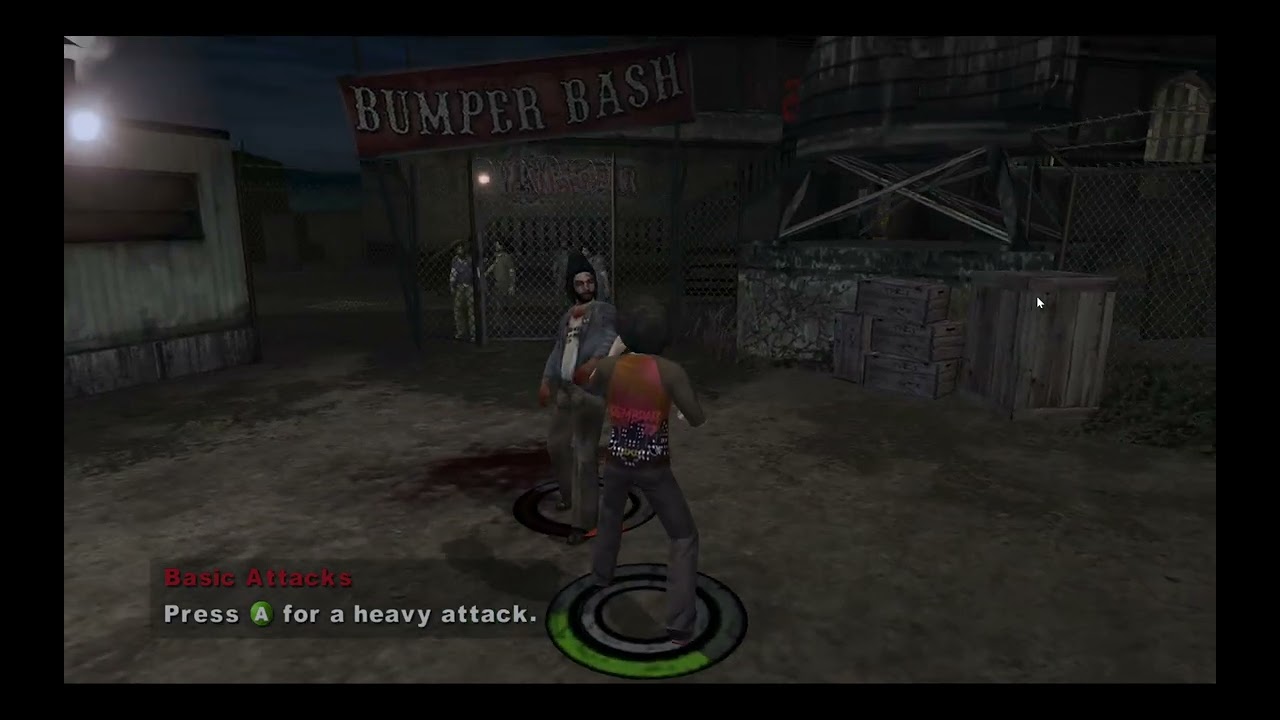
Playing the alpha
What you need
- Windows 10 or 11, 64-bit.
- A GPU and driver with Direct3D 12 support.
- 8 GB of RAM or more.
- About 1 GB of free space for the port, plus the game itself (up to 8 GB as a disc image).
- The original Xbox version of The Warriors, NTSC (USA) retail disc. The PS2 and PSP versions do not work, and other Xbox releases (PAL, other regions) have a different
default.xbethat this build was not made from. - An Xbox or XInput controller is recommended, but the keyboard and mouse work too.
You do not need Visual Studio, a compiler or anything else installed: everything the port needs is in the zip.
1. Download
Download Warriors.zip from the Releases page.
2. Extract
Extract the whole zip into a new, empty folder of its own, for example C:\Games\The Warriors. Keep the folders the way they are in the zip.
- Pick a folder you can write to: not
C:\Program Files, and preferably not one OneDrive syncs (Desktop and Documents often are). The port writes its game code, saves, settings and logs besideWarriors.exe. - Do not run it from inside the zip.
The folder should look like this:
The Warriors\
    assets\              <- the game goes here
    compiler\            <- builds the game code on the first start
    Warriors.exe
    msvcp140.dll, vcruntime140.dll, vcruntime140_1.dll
    README.md, THIRD_PARTY.txt
3. Add your game
Put your copy of the game in the assets folder, in one of these two forms:
A disc image (easiest). Drop the .iso straight into assets, with any file name. These all work:
- a full disc dump, such as a Redump style image (about 7.3 GB), which has the video partition in front of the game,
- the game partition alone, often called an xiso (made by tools such as extract-xiso or xdvdfs).
Only .iso is read. A .7z, .zip, .rar, .cso or split image must be extracted or converted to a single .iso first.
The extracted game files. Copy the contents of the disc into assets, so default.xbe sits directly in it:
assets\
    audio\
    bik\
    default.xbe
    Main.wad0 ... Main.wad3
    Paks.wad0 ... Paks.wad2
    System.wad0
    XBoxWad.idx
The port checks the game's default.xbe, which must be the NTSC retail release it was made from:
sha1 fe246a74501cd10d2ce89ca5dbda5080d2b2edcc
If yours is a different release, the port says so and asks whether to start it anyway. It will most likely crash.
4. First start: building the game code
Run Warriors.exe. The first time, a progress window appears while the port turns your game's code into Warriors.dll, with the Clang compiler in the compiler folder. Nothing from the game ships in the zip, so it is made on your PC from your own copy.
- It takes a few minutes: about 2 minutes on an 8 core CPU with 16 GB of RAM, longer with less memory or fewer cores. It builds more files at once the more RAM is free, so closing other programs helps.
- Let it finish. If it is closed part way, the next start builds again.
- Your antivirus may scan every file the compiler writes, which slows it down a lot. Adding the port's folder as an exclusion helps.
- Windows SmartScreen may say "Windows protected your PC", since the exe is not signed. Click More info, then Run anyway.
This happens once. Later starts go straight into the game. A new release of the port builds again on its first start.
5. Play
The game starts in a borderless window on your main display. On a widescreen display it runs in its own 1280x720 widescreen mode, as on a 720p TV; on a 4:3 display it keeps 480p. Press F10 at any time for the settings panel: display mode, resolution, VSync, render scale, anisotropic filtering, MSAA anti-aliasing, mouse sensitivity, every key binding, and the controller's camera speed, dead zone, vibration and button layout.
With a controller it plays as on the Xbox. With the keyboard and mouse, the mouse turns the camera and the default keys are below. The button prompts in the game show your keys while you use the keyboard and mouse, and the controller's buttons once you pick up the pad. The stick minigames (picking a lock, taking a car stereo) are played by circling the mouse, and a bar on screen stands in for the controller's vibration when you look for the lock's sweet spot.
Files the port writes
All of these sit beside Warriors.exe:
| File or folder | What it holds |
|---|---|
Warriors.dll | The game code built on the first start. |
compiler\work\ | The first start's build files, kept to tell when a rebuild is needed. |
hdd\ | The Xbox hard drive: your saves. |
settings.toml | Everything set in F10. Delete it to go back to the defaults. |
logs\ | warriors.log from the last run and compile.log from the first start. |
CrashDumps\ | A dump for each crash, for bug reports. |
Updating to a new release
Extract the new zip into a new folder, then copy over your hdd folder (saves) and settings.toml from the old one, and move your game into the new assets. The new version builds its game code again on its first start.
Troubleshooting
| Problem | What to do |
|---|---|
| "Put the game in the assets folder" | The assets folder has neither an .iso nor default.xbe. Check that the image is not still zipped, and that extracted files are not one folder too deep (assets\The Warriors\default.xbe). |
| "...is a different release of the game" | Your default.xbe is not the NTSC retail one. Only that release is supported for now. |
| The first start fails | The message names the step that failed; the details are in logs\compile.log. Most often it is low disk space, the antivirus removing clang.exe or lld-link.exe (restore them and add an exclusion), or a folder Windows will not let the port write to. |
| It closes or freezes in game | Open an issue with logs\warriors.log and the newest dump in CrashDumps, and what you were doing. |
| Black screen or no window | Update your GPU driver. On a laptop with two GPUs, set Warriors.exe to the high performance GPU in Windows Settings, System, Display, Graphics. |
| No sound | Set the playback device you want as the Windows default before starting the game. |
| The controller does nothing | Connect it before starting the game. Xbox and XInput pads work best. |
| The mouse is not captured | Click into the game window. Alt+Tab frees the mouse. |
Reporting a problem
Open an issue with:
- what happened and what you were doing (mission, menu, cutscene),
logs\warriors.log(andlogs\compile.logif the first start failed),- the newest file in
CrashDumpsfor a crash, zipped, - your GPU, and whether you used the disc image or the extracted files.
Default keys
| Action | Keys |
|---|---|
| Move, walk | W A S D, Left Alt |
| Camera | Mouse |
| Light attack (X) | Left mouse |
| Heavy attack, charge (A) | Right mouse, Enter |
| Grab, throw (B) | E, Backspace |
| Action: jump, climb, mug (Y) | Space |
| Sprint (LT) | Left Shift |
| Target, reverse a grapple (RT) | Q |
| Block (Black) | F |
| White | R |
| Rage (both triggers) | Z |
| Gang commands (left stick click) | C |
| Right stick click | Middle mouse, V |
| D-pad | Arrow keys, 1 2 3 4 |
| Pause (Start), Back | Escape, Tab |
| Settings panel | F10 |
In menus the left mouse button selects, the right button backs out and the wheel scrolls. Every key can be rebound in F10.
Known issues
- Only the opening missions have been played so far. Later missions may crash or show broken effects.
- The game runs at 30 FPS, its own frame pacing; nothing unlocks it yet. The camera follows the mouse at that rate too.
- 3D sounds are panned by their direction with an interaural delay and a head shadow model, not the console's own HRTF filters. LFOs, the pitch and filter envelope and the I3DL2 occlusion filters are not reproduced.
- The game's Bink version differs from the one the SDK knows, so Bink movies do not get the SDK's frame rate fix.
- The stick the HUD draws as a picture by the minimap still shows the controller, and prompts in languages other than English name the pad in words.
- Things the game times by presented frames rather than by its world clock may run faster than on the console. The lock pick is fixed; other HUD effects and minigames have not all been checked.
- Only the NTSC retail release is supported.
Changelog
v0.2.0 alpha
- Audio rework. DirectSound now behaves the way the game's XACT sound engine expects (
src/audio/dsound.cpp):- 3D sounds (punches, footsteps, voices, ambience) play through their submixes as on the console, at their distance, cone, front, rear, centre and reverb levels, with Doppler pitch.
- Each 3D sound is panned by its direction, with an interaural delay and a head shadow.
- Amplitude envelopes, and stops that let a sound release instead of cutting it off.
- Fixed a cause of dialogue going silent after a stopped line, which also slowly used up XACT's voices so that sounds went missing (#1, #2).
- A skipped cutscene's audio stays stopped.
- 720p widescreen. On a widescreen display the game uses its own 1280x720 mode with its widescreen framing, in place of a 640x480 frame stretched to 16:9.
- MSAA. Anti-aliasing (off, 2x, 4x or 8x) in the F10 display settings.
- The frame rate cap is gone from F10, since the game world steps at 30 FPS whatever it is set to. VSync stays.
- Mouse minigames. The lock pick and car stereo minigames play with the mouse, with a bar showing the lock pick's vibration while the keyboard and mouse are in use (#3).
- The lock pick's tumblers turn at the console's speed. They spun twice as fast or more, and the third could not be stopped.
- Prompts. "Click the left thumbstick" reads "Press [C]", the right stick's click names its key, the HUD's action icon over people and objects shows the action key, and the prompts to alternate the triggers name each key.
v0.1.0 alpha
- First public release: the game recompiled to native code, rendered with Direct3D 12 and played through XAudio2, run from a disc image or the extracted files.
- Controller support, keyboard and mouse with native mouse-look, keys shown in the game's button prompts, and the F10 settings panel.
- Cutscene audio fixes, pitch, and a skippable Rockstar logo.
Progress
- Recompiled from the NTSC retail XBE (XDK 5849, sha1
fe246a74501cd10d2ce89ca5dbda5080d2b2edcc). - XDK symbols the signature scan could not resolve on a retail disc, found by hand and documented in
config/game.toml. - DirectSound is the SDK's with what XACT relies on in this game, built in its place (
src/audio/dsound.cpp): mix-in buffers, so XACT's 3D sounds play through their submixes as on the console; XACT's 3D voice data, with its distance, cone, front, rear, centre and reverb levels, Doppler pitch and the direction that pans each sound between the ears; amplitude envelopes, and stops that let them release; the library's stream pause and flush rules; and the voice properties XACT reads back when it moves a sound to another submix. - DirectSound exports the SDK has no name for (pitch, LFO, cones, 3D voice data, output buffers, sound streams made through
IDirectSound), handed to it fromsrc/game/dsound.cpp. - The MCPX APU sample counter that XACT reads directly, kept running in
src/common/apu_clock.cpp. - XACT's streamed cues (cutscene dialogue and music) wait until they are started and stay stopped once stopped, so skipped cutscenes no longer keep playing their audio, and the line after a stopped one is no longer held silent (which also slowly used up XACT's voices).
D3DDevice_DrawIndexedVerticesUP, which the SDK has no version of, drawn through the host'sDrawVerticesUP(src/game/d3d.cpp).- The game's own 720p widescreen mode on a widescreen display, through the SDK reporting a 720p TV to a title that asks for it, and MSAA for the screen sized render targets.
- Sound pitch and pitch variation, carried over to the host mixer's frequency.
- The Rockstar logo can be skipped like the other boot movies (
src/game/movies.cpp). - Keyboard and mouse for player 1, alongside a controller on the same port (
src/game/kbm.cpp). The mouse turns the camera itself by its own angle, as on PC, through the camera's yaw and pitch speeds (src/game/camera.cpp), and stands in for the right stick where the camera does not read it (the gang command menu). - The stick minigames play with the mouse: where the world runs with no camera to turn (picking a lock, unscrewing a car stereo), the mouse holds both sticks where it pushes them and circles them round the rim, and while the keyboard and mouse are in use a bar on screen shows the vibration the lock pick is found by.
- The lock pick's tumblers turn by the console's 30 steps a second for the real time passed (
src/game/lockpick.cpp), as the port presents more frames than the console's 30. - Button prompts show the keys bound to them while the keyboard and mouse are in use, and the controller's buttons again once it is used (
src/game/prompts.cpp): the text's button icons, the HUD's action icon, the words that name the pad ("click the left thumbstick", "pull and release both triggers", "alternate pulling the right and left trigger"), even where the help text colours them, and the title screen's PRESS START, which becomes PRESS ANY KEY. They follow rebinding at once. - A settings panel on F10 (
src/game/menu.cpp).
Credits
- Xbox XBE Recomp by TGP482, the recompiler and runtime this is built on, and SCDA-XBERecomp, which this project follows.
- XenonRecomp for the overridable function layout and instruction hooks.
- Zydis for decoding x86 instructions, toml++ for the configs, Dear ImGui for the settings overlay and SDL for the window, input and controllers.
- LLVM for the Clang compiler and LLD linker that build the game code on the player's PC.
Comentarios (0)
Inicia sesión para dejar un comentario.
Sé el primero en comentar sobre este juego.