

Spider-Man (OpenSpidey)
Port nativo de Spider-Man (OpenSpidey) para PC.
Spider-Man (OpenSpidey)
Port nativo basado en krystalgamer/spidey-decomp.
README del repositorio
OpenSpidey
Your friendly neighborhood PC rebuild.
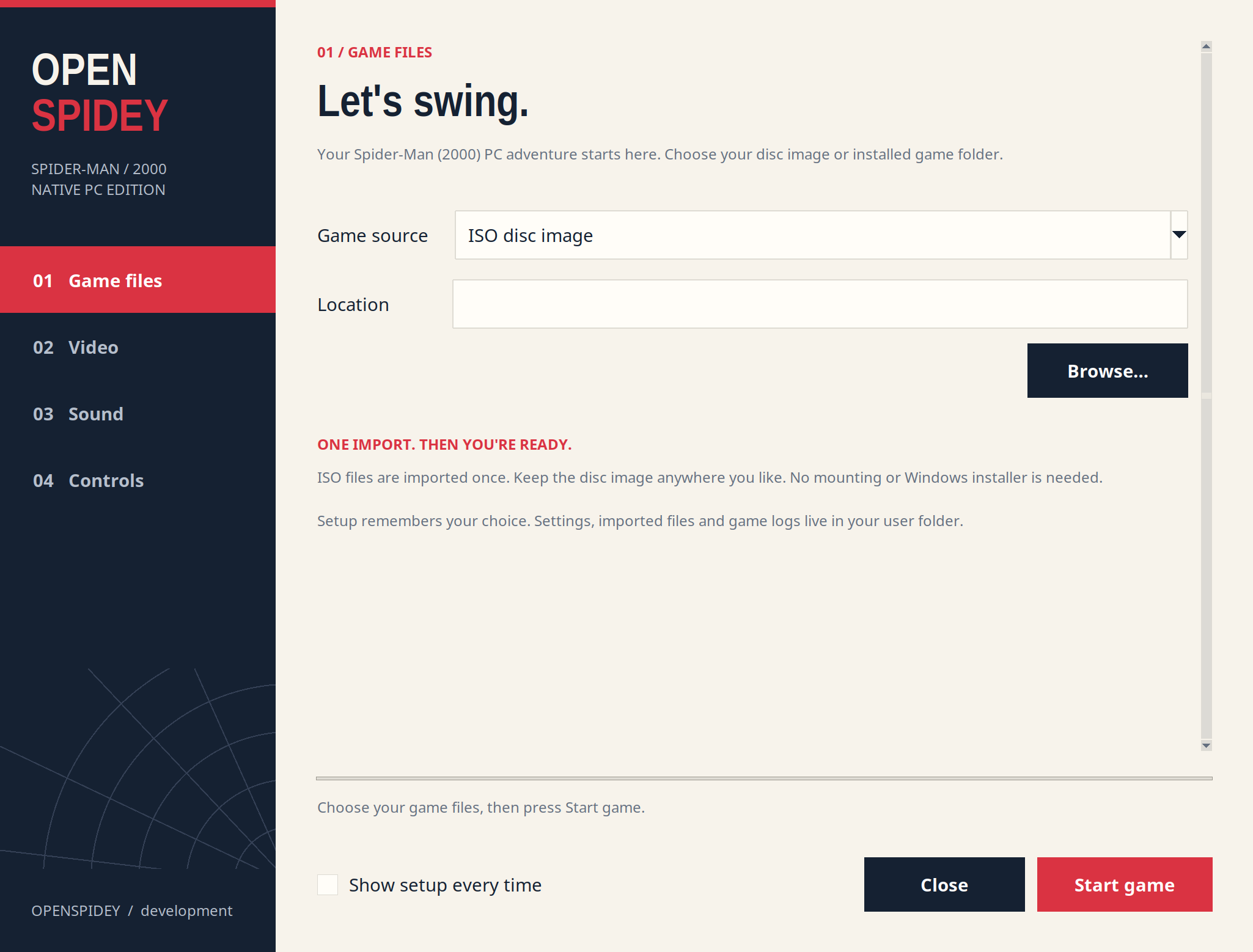
OpenSpidey brings Spider-Man (2000) for PC to a native SDL3 and OpenGL engine. Choose your game files, set up the picture, sound and controls, then press Start game. The app remembers your choices.
Download OpenSpidey · What changed · Build from source · Report a problem
Start playing
- Download the Linux or Windows app from the release page.
- Extract the whole archive into one folder.
- Open OpenSpidey on Linux or OpenSpidey.exe on Windows.
- Choose your Spider-Man (2000) PC disc ISO, or its installed game folder.
- Pick your video, sound and control settings, then press Start game.
Setup imports the files it needs from an ISO. You do not need to mount the disc, run the original installer or copy files by hand. The app reads your original executable's data; it does not run code from that executable. Only the supported original PC executable is accepted. Other editions, regional builds or modified executables may need further support.
The next launch uses your saved settings. To change them, open OpenSpidey-Settings on Linux or OpenSpidey Settings.exe on Windows. You can also select Show setup every time in the setup window.
Pick your settings
| Page | Options |
|---|---|
| Game files | PC disc ISO or installed folder |
| Video | Windowed, borderless fullscreen or fullscreen; resolution; antialiasing; texture filtering; smooth distant textures; VSync |
| Sound | Master volume, music and voices, sound effects |
| Controls | Modern controls, mouse sensitivity, vertical mouse inversion, opening movie skip |
The game keeps its original picture proportions, with black bars where needed. Distant loaded buildings stay visible by default. Antialiasing and world texture filtering reduce jagged edges and texture shimmer. Borderless fullscreen uses your desktop resolution automatically.
Controls
| Action | Default control |
|---|---|
| Move | WASD or arrow keys |
| Look | Mouse |
| Jump | Space |
| Punch | Left mouse button |
| Shoot webs | Right mouse button |
| Select | Enter |
| Pause or skip an eligible scene | Escape |
| Release or capture the mouse | F1 |
| Quit | F12 |
Turn off Modern controls in setup to use the original keyboard layout.
Downloads and requirements
| Download | Use |
|---|---|
openspidey-<version>-linux-x86_64.tar.gz | Linux app for a 64 bit x86 desktop with glibc 2.35 or newer, such as Ubuntu 22.04 or newer |
openspidey-<version>-windows-x86_64.zip | Native app for 64 bit Windows 10 or newer |
openspidey-<version>-windows-binkw32.zip | Separate developer DLL for the original Windows game |
| Source archives | Build or study OpenSpidey and its bundled runtime |
The app packages include their setup launcher, SDL3 and the movie/audio decoder. You do not need Python or a separate FFmpeg install to use them. The game itself is 32 bit; the setup launcher is 64 bit.
The Linux package includes a 32 bit runtime and a Mesa software rendering fallback. It checks your installed 32 bit graphics stack and uses hardware acceleration when that works. Otherwise it uses the bundled runtime. Software rendering can be slower. There is no native macOS build.
You need your own PC game data. Downloads contain no original game
assets. An installed folder must contain SpideyPC.exe, data.pkr,
media.pkr and texture.dat, and must be writable so the game can load
archives and save progress.
Saves, settings and logs
ISO imports, saves and game logs are kept in your user data folder. Updating
the app or choosing another ISO preserves the imported game's save folder.
An installed folder remains the game's working folder and holds its saves.
| System | Settings | Imported game and logs |
|---|---|---|
| Linux | ~/.config/openspidey/settings.json | ~/.local/share/openspidey/ |
| Windows | %APPDATA%\OpenSpidey\settings.json | %LOCALAPPDATA%\OpenSpidey\ |
Linux also follows XDG_CONFIG_HOME and XDG_DATA_HOME. Once an ISO has been
imported, its cached files can be used even if the ISO is moved. A failed
game run shows the path to its log. Include that log, your map and the last
action you took when reporting a problem.
Current progress
This is a development preview. Rendering, player controls, thug behavior, web effects, sound, dialogue and cinematics have advanced since v0.0.2. The full game restoration and matching decompilation are still unfinished.
The latest Linux gameplay checkpoint loaded 68 map entries and 23 training configurations and checked short idle gameplay. Separate tests checked melee attacks, web balls, tug release, camera turns, audio and texture filtering. These checks do not mean every mission, boss, spawn wave or training objective has been completed. Police AI and other game functions still need work. The native Windows app passed setup, movies, main-menu and short level-one checks under Wine. It still needs testing on Windows hardware and across complete missions.
Detailed results are in the gameplay checkpoint and test scenarios.
Development and credits
Read the build guide and contribution guide to work on the engine or decompilation. CI builds native Linux and Windows apps and checks the separate original-game DLL. Runtime libraries and their licenses are listed in the packaging notes.
OpenSpidey is built on krystalgamer/spidey-decomp. Credit for the original decompilation project, its tools and reverse engineering work belongs to krystalgamer and its contributors. This project continues that work with a native app and uses the original binary as a reference. AI coding agents assist with implementation and testing.
Spider-Man (2000) was made by Neversoft and ported to PC by LTI Gray Matter. Spider-Man and the original game assets belong to their respective owners.
Comentarios (0)
Inicia sesión para dejar un comentario.
Sé el primero en comentar sobre este juego.