SimAnt
Port nativo de SimAnt para PC.
SimAnt
Port nativo basado en su ficha de origen.
README del repositorio
Leia em português: README.pt-BR.md
SimAnt recomp
A modern reimplementation of SimAnt: The Electronic Ant Colony (Maxis, 1991, Windows 3.x version) in Rust + SDL2, for current Windows and Linux. The game logic is rewritten from a written specification, checked tick by tick against the original game running in an emulator; graphics, sounds, music, texts and help are read from your own copy of SimAnt, which this project does not distribute. The port can be changed by mods (JSON data and sandboxed Lua scripts).
Legal notice. This is a non-profit fan project, not affiliated with or endorsed by Maxis or Electronic Arts. "SimAnt" and "Maxis" are trademarks of their respective owners. This repository and its releases do not contain any file from the original game (graphics, sounds, music, text, executable): to play, you need your own copy of SimAnt for Windows 3.x. Please do not ask for or share copies of the game in the project's channels.
Status
Version 1.0.0 was released on 2026-10-20 (see the changelog), with the mod API frozen at 1.0. What works:
- The original's four modes: Tutorial, Quick Game, Full Game (yard and house, with patch switching) and Experimental.
- A simulation identical to the original, tick by tick: hundreds of tick vectors recorded from the original game are reproduced bit for bit by the test suite.
- The original's screens and windows, compared pixel by pixel with captures of the original; saves in
the original
.ANTformat (a save written by the port opens in SimAnt); the original's help, cheat codes, sound effects and music. - Modern conveniences: sharp integer scaling, 640×480, 800×600 or 1024×768 virtual screen, the Windows 3.1 title bar as the window frame (on by default), a startup launcher in English and Portuguese, music through a simple synthesizer by default (FM and SoundFont optional), preferences kept between games, mods (data and sandboxed Lua scripts).
What is still missing or different is listed in docs/estado-do-projeto.md
(project status) and docs/divergencias.md (known divergences from the
original).
Languages
The launcher is available in English and Portuguese; the game itself is in English, like the original
(the port's own texts go through the language frame in data/idiomas/, docs/i18n.md,
so other languages can be added, also by mods). The project documentation is in English, with every document also available in Portuguese
(the link on the first line of each file).
Playing
Download
Get the package for your system from the releases page
(Windows x64 .zip, Linux x64 .tar.gz) and unpack it into any folder. The package contains the
executable, the port's data, example mods and a user guide (README.txt in English, LEIAME.txt in
Portuguese — the same text as README-user.md and
LEIAME-usuario.md).
Requirements
- Windows 10 or 11, 64-bit: nothing else (
SDL2.dllis included). - Linux x86-64 (glibc 2.35 or newer) with the system SDL2:
sudo apt install libsdl2-2.0-0(Debian/Ubuntu),sudo dnf install SDL2(Fedora),sudo pacman -S sdl2-compat(Arch). - Your SimAnt for Windows 3.x files: the installed game folder (usually
C:\MAXIS\ANTWIN) withSHARED.NDX/.DATandWINGANT.NDX/.DAT(required),SOUND.NDX/.DATand theSOUNDfolder (sound and music),SIMANTW.EXE(cursors; only read, never run),SIMANT.HLP(help),FONTRES.FONandFONT1–FONT4(fonts). The port only reads these files and never changes them.
The launcher
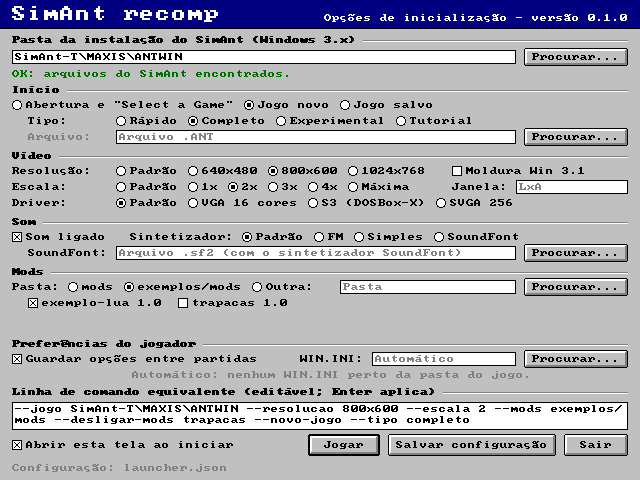
Run simant.exe (Windows) or simant (Linux). Without options it opens the startup options screen
(simant/src/launcher/, drawn with SDL2 without anything from the original game; the screenshot above
was recorded by simant --capturar-launcher): the SimAnt installation folder (system folder picker,
checked for SHARED.NDX, WINGANT.NDX...), how to start (title screen, a new game of each type or a
save), video, driver profile, sound and synthesizer, the mods folder and each mod on or off,
preferences and the equivalent command line, editable. The choices are stored in launcher.json in
the user data folder and also apply when simant is run with options, which win
(simant/src/config_launcher.rs; decision in docs/decisoes.md). On Windows, the
release executable doesn't open a console: its output goes to simant.log and fatal errors appear in a
message box (--console turns a console on). data/ and mods/ are looked up next to the executable
(and then in the current folder).
How to play
You are the yellow ant of a black colony, against the red ants, in the yard of a house. The modes
(chosen in "Select a Game"; Enter = Full Game, as in the original) are Tutorial, Quick Game, Full Game
and Experimental; see telas/abertura.md,
telas/quintal.md and telas/experimental.md.
- Mouse: a click on a cell takes the yellow ant there; a double-click acts (attacks, asks for food, picks up or drops, digs). Holding the button on the yellow ant opens its menu. Space/Insert click where the cursor is.
- Yellow ant keys: 1/2 recruit 5/10 workers (Ctrl+2: all), 3/4 release half/all, 0 alarm, X or F9 switches body, Backspace cancels, Home centers the view.
- Speed and game: Shift+0 pauses, Shift+1..4 slow/normal/fast/ultra (fast and ultra at 2.5×
and 5× normal; without the window's focus, slow — user's choices, configurable), Ctrl+G
AutoTrack, Ctrl+S saves, Ctrl+A saves as, Ctrl+L loads a
.ANT, Ctrl+N new game. The.ANTwritten is accepted by the original SimAnt. - View: Ctrl + arrows scroll the edit window (the arrows alone and PageUp/PageDown too, a port extension); Ctrl+8/9/0 or the ribbon's Surface/Nest buttons switch planes.
- Windows: Ctrl+E edit window, Ctrl+B Behavior Control, Ctrl+C Caste Control, Ctrl+H History, Ctrl+I Info, Ctrl+M map (or the yard, if open), Ctrl+Y/5/6/7 the yard in yard, house, strategic and graph modes. In the yard, double-clicking a patch switches patch (Full Game). Window manager: Ctrl+F4 closes, Ctrl+F6 next, Ctrl+Space system menu, Ctrl+Z maximizes the edit window.
- Ribbon: the configurable buttons of the second row (Ctrl+click changes the function), bookmarks 1–7 (Ctrl+click stores the view), the health bars (a click opens the caste chart) and, in Experimental, the tools menu.
- Help: F1 opens
SIMANT.HLP; Shift+F1, Delete, the right click or the ? buttons turn on help mode (the next click opens the topic of whatever was clicked). - The original's cheat codes: type 4 letters during a game (
heal,just,qeen,eggs...); list inregras/trapacas.md.
All keys come from data/partida.json, data/navegacao.json, data/janelas.json,
data/quintal_mapa.json and data/ajuda_contexto.json. What is still missing for players is in
docs/estado-do-projeto.md §4.
Command-line options
| Option | Effect |
|---|---|
--jogo DIR, --dados DIR, --mods DIR | folders of the game (default: the launcher's, SIMANT_DIR or SimAnt-T/MAXIS/ANTWIN), of the data (data) and of the mods (mods), relative to the executable's folder (or to the current one, if there is no data/ there) |
--desligar-mods A,B | doesn't load these mods (names from mod.json) |
--launcher, --config FILE, --sem-config | opens the launcher; another launcher.json; ignores the launcher configuration |
--console, --capturar-launcher FILE.png | (Windows, release executable) messages in a console instead of simant.log; records the launcher screen without opening a window |
--novo-jogo, --tipo T, --semente N | new game of type tutorial, rapido (Quick, default), completo (Full) or experimental, with a fixed seed (reproducible) |
--save FILE.ANT, --salvar FILE.ANT | opens a save; --salvar writes the state at the end of a windowless run and, in the window, is the "save as" name (Ctrl+A; without it, SALVO01.ANT, SALVO02.ANT...) |
--resolucao WxH | Windows 3.1 virtual screen: 640x480 (default), 800x600 or 1024x768; changes the layout like the original (windows at the resolution's position table, more free area around), without scaling anything (telas/resolucao.md) |
--escala N, --janela WxH | scaling of the virtual screen (integer, sharp) and initial window size; 0 = the largest that fits |
--moldura, --sem-moldura | turns on or off the Windows 3.1 title bar and system menu above the menu bar (moldura_windows31, on by default); when on, it replaces the system frame. Tests and exports (options in the table's last row, --ticks, --avancar-ms, --salvar) run without it, as before, unless --moldura is given |
--moldura-do-sistema, --sem-moldura-do-sistema | with --moldura, keep the system frame (the bar stays inside it) or replace it with the Windows 3.1 one (default; substituir_moldura_do_sistema) |
--velocidades proporcional|original | pace of Fast/Ultra: 2.5× and 5× Normal (default, user's choice) or the pace of the original's loop on the test bench's 486 (data/partida.json → relogio.ritmo_velocidades) |
--sem-foco lenta|original | without focus, the simulation runs at Slow and returns to the chosen speed with focus (default), or keeps the pace like the original (relogio.sem_foco_velocidade); the speed of the save and of the menu doesn't change |
--perfil-driver NAME | emulated video driver profile (vga, svga256, s3_dosbox; data/resolucao.json → perfis_driver) |
--sem-som (--com-som), --sintetizador NAME, --soundfont FILE.sf2 | no audio (or with audio, overriding the launcher); music synthesizer: simples (default in data/som.json, user's choice: what sounds closest to the original to them), fm (our own FM in the style of the Sound Blaster's OPL, bank data/opl_banco.json; the closest to the capture of the original by the measurements) or soundfont (General MIDI SoundFont, or SIMANT_SOUNDFONT) |
--preferencias FILE, --sem-preferencias | file of the options kept between games (in place of WIN.INI's [SimAnt]; default in %APPDATA%\SimAnt recomp\SimAnt\) |
--win-ini FILE | WIN.INI read (read-only) as the source of the options while the file above doesn't exist; default: WINDOWS/WIN.INI in the game folder or in the two above it |
--ticks N, --avancar-ms MS, --acoes A,B, --quintal M, --janela-mapa M, --mini-mapa N | non-interactive tests: runs ticks, lets real time pass, applies navigation actions, opens the yard, the map in a mode or the mini map (N openings) |
--exportar-tela-jogo FILE.png, --exportar-telas DIR, --exportar-som DIR [--exportar-musica ID], --capturar-janela FILE.png, --sair-apos-ms N | records the game screen, the title screens, the effects and songs as WAV, or what the window showed |
Video options (data/video.json)
{"resolucao_virtual": [640, 480], "escala": 1, "janela": null, "redimensionavel": true, "escala_inteira": true, "moldura_windows31": true, "substituir_moldura_do_sistema": true}
resolucao_virtual: the Windows 3.1 resolution the port emulates. The original SimAnt doesn't scale anything: on a bigger screen there is more free area around, and some windows (title, Caste/Behavior, Info, end of game, yard) move, following the position table the game itself chooses by the screen height (one up to 480 lines, another above).[640, 480]is the default (the test bench);[800, 600]is the one of the reference DOSBox-X;[1024, 768]uses the same positions as 800×600 with more free area. The rule is indata/resolucao.json.escala,janela,redimensionavel,escala_inteira: how the virtual screen appears on the monitor — scaled by integer multiples (sharp pixels, bars around) or, withescala_inteira: false, filling as much as possible while keeping the aspect ratio.moldura_windows31: draws, above the menu bar, the main window's title bar as Windows 3.1 shows it with SimAnt maximized (system menu box, "SimAnt", minimize and restore); the window then holds the whole emulated screen (640 × 480 at scale 1). The system menu opens from the box or with Alt+Space: Minimize minimizes the window, Close asks the Quit question, Restore restores the window if it is maximized, Switch To does nothing. Defaulttruein 1.0 (user's choice;falseuntil then); the non-interactive runs (--exportar-telas,--exportar-tela-jogo,--ticks,--avancar-ms,--salvar,--sair-apos-ms,--capturar-janela,--exportar-som) run without the frame if--moldurais not given, to produce the same output as before (telas/menus.md§8,decisoes.md).substituir_moldura_do_sistema(port extension, user's choice; defaulttrue): with the frame on, the window has no system border and the Windows 3.1 bar is the real frame: dragging the title strip moves the window, double-clicking it maximizes or restores, the right button maximizes (up arrow) or restores, minimize minimizes, the system menu switches Restore/Maximize according to the state and Alt+F4 asks the Quit question. When restored, the window has Windows 3.1's 4-pixel thick frame flush with the edges, which resizes by the edges and corners (the game stays centered inside it); when maximized, the game is scaled by integers in the monitor's work area. The buttons and the system menu always work — also with a dialog or warning open and in "Select a Game" (in the original they stay frozen there) —, and closing (Close, double-click on the box, Alt+F4) always asks the Quit question, cancelling whatever dialog is open.false= the bar inside the system window.- The command line (
--resolucao,--escala,--janela,--moldura,--sem-moldura,--moldura-do-sistema,--sem-moldura-do-sistema) wins over the file; a mod can bring its ownvideo.json.
The complete list, with the debug options, is in the comment at the top of simant/src/main.rs and in
simant/src/opcoes.rs.
Mods
A mod is a folder in mods/ with a mod.json (nome, versao, dependencias, scripts). It can
replace objects of the original database (objetos/<tipo>/<id>.bin), the port's data files
(data/<nome>.json, merged by key: the mod brings only what changes) and the game's loose files
(arquivos/<nome>), and bring sandboxed Lua scripts with hooks (ao_iniciar, depois_do_tick,
ao_evento, ao_menu, hooks inside the tick such as antes_superficie...), validated writes (food,
scents, castes, ants in the nests) and their own state saved next to the save (JOGO.ANT.mods.json;
the .ANT stays the original's format). The API, the list of overridable files and the compatibility
history are in docs/api-mods.md (current version at the top).
Examples in exemplos/mods/ (outside mods/, so they don't change the game by default): exemplo-lua/
(food rain every 500 ticks) and trapacas/ (F12 menu to trigger rain, mating flight, boy, cat,
end of game, castes, alarm, soldiers in the nest, advancing ticks, debug panel; the cheat count goes
into the save). To turn them on: --mods exemplos/mods.
Building from source
You only need this if you want to change the code or build for a system without a ready-made package; players can simply download the latest release. In every case you still need your own copy of SimAnt for Windows 3.x (see Requirements).
1. Install the tools
Windows 10/11 (x64)
- Git.
- Visual Studio Build Tools with the "Desktop development with C++" workload (the MSVC linker, and the C compiler used to build the embedded Lua).
- Rust through
rustup-init.exe, accepting the default (stable, MSVC) toolchain.
Linux (x64)
# Debian / Ubuntu
sudo apt install build-essential git curl libsdl2-dev
# Fedora
sudo dnf install gcc git curl SDL2-devel
# Rust (any distribution)
curl --proto '=https' --tlsv1.2 -sSf https://sh.rustup.rs | sh
2. Get the code
git clone https://github.com/Tim-campy/simant-recomp.git
cd simant-recomp
3. SDL2 (Windows only)
On Windows the build links against the official SDL2 2.30.9 development package, which is not stored
in the repository. Download it once into vendor/ (PowerShell, inside the project folder):
mkdir vendor
curl.exe -L -o vendor\SDL2-devel-2.30.9-VC.zip https://github.com/libsdl-org/SDL/releases/download/release-2.30.9/SDL2-devel-2.30.9-VC.zip
tar -xf vendor\SDL2-devel-2.30.9-VC.zip -C vendor
You should end up with vendor\SDL2-2.30.9\lib\x64\SDL2.dll. On Linux the system's libsdl2-dev
installed in step 1 is used instead.
4. Build and run
cargo build --release
The first build downloads the Rust dependencies and takes a few minutes. The result is
target/release/simant.exe on Windows (with SDL2.dll copied next to it) or target/release/simant
on Linux. Run it:
cargo run --release -p simant                                  # opens the launcher
cargo run --release -p simant -- --novo-jogo --tipo completo   # straight into a new Full Game
cargo run --release -p simant -- --help                        # every option
On the first start, point the launcher to the folder of your SimAnt installation (the one with
SIMANTW.EXE, SHARED.DAT, WINGANT.DAT, SOUND.DAT...). Alternatively put that folder in
SimAnt-T/MAXIS/ANTWIN/ inside the project, pass --jogo <folder>, or set the SIMANT_DIR
environment variable. Nothing in the game folder is ever modified.
5. Make a portable folder (optional)
The executable finds data/ next to itself, so a playable folder only needs:
simant.exe        (or simant on Linux)
SDL2.dll          (Windows only)
data/
exemplos/mods/    (optional: the example mods)
This is what the release packages contain (they are built by .github/workflows/release.yml, which
also adds the licenses and third-party notices).
Tests
cargo test --workspace
cargo clippy --workspace --all-targets -- -D warnings
The tests that use real files look for the game in SIMANT_DIR or in SimAnt-T/MAXIS/ANTWIN and warn
and pass without them. The original's tick vectors (tests/referencias/, see the
README there and regras/testes-tick.md)
require bit-for-bit equality of the state after each tick (engine/tests/ticks_originais.rs,
ticks_longos.rs). The test bench that runs the original in QEMU is described in
docs/bancada-qemu.md; the extractors of the executable's tables are in
tools/ (tools/conferir_extracoes.py SIMANTW.EXE checks that they reproduce the data/*.json files).
Project layout
| Folder | Contents |
|---|---|
engine/ | windowless crate: formats (original formats), rules (simulation), core (screens, windows, game), recursos (original + mods), scripts (Lua) |
simant/ | SDL2 executable (video, audio, input) |
data/ | the port's data (rule tables, screens, keys, texts): what mods override |
exemplos/mods/ | example mods |
tools/ | Python extractors and inspectors, QEMU test bench, capture comparison |
tests/referencias/ | tick vectors, cases and scripts recorded from the original |
referencia/ | DOSBox-X configuration to run the original |
docs/ | specification, decisions, glossary, divergences, mod API, project status |
Documentation
docs/spec/— the specification: file formats, screens and rules of the original, with the evidence for each statement.docs/estado-do-projeto.md— project status: what is done, verified and missing.docs/divergencias.md— where the original differs from its documentation or from the port, and how it was observed.docs/decisoes.md— decision log (date, decision, reason, discarded alternatives).docs/glossario.md— glossary of the original's internal names.docs/api-mods.md— mod API.docs/bancada-qemu.md— the QEMU test bench that runs the original.docs/lancamento.md— release checklist.
Contributing
Contributions are welcome. The project follows a strict method: specification before code, the
original game as the oracle, and no claim about the original's behavior without evidence. Read
CONTRIBUTING.md before opening a pull request.
License
The project's code, data and documentation are licensed under either the
Apache License 2.0 or the MIT license, at your option (see
LICENSE). The license does not cover SimAnt itself: the original game and its files,
graphics, sounds, music and texts belong to their respective owners (Maxis / Electronic Arts).
SimAnt © 1991 Maxis.
Comentarios (0)
Inicia sesión para dejar un comentario.
Sé el primero en comentar sobre este juego.