

Rocket Knight Adventures
Port nativo de Rocket Knight Adventures para PC.
Rocket Knight Adventures
Port nativo basado en su ficha de origen.
README del repositorio
Special thanks to l0ll0_76 (L0LL0) for extensive QA and playtesting of Rocket Knight Adventures Recomp.
Rocket Knight Adventures Recomp
An unofficial native PC port of Rocket Knight Adventures (Konami, 1993) for the Sega Genesis / Mega Drive, built with the Genesis recompilation framework. Play with adaptive widescreen, remappable controls, rewind, and a visual save-state browser.
Version 1.0 is the first stable release: adaptive widescreen covers all seven stages and is on by default.
Download v1.0.3 · Release notes · Report a bug
You must supply your own Rocket Knight Adventures (USA) ROM. The source and release packages do not include the game ROM.
Adaptive widescreen in action
| Forest | Crystal caves |
|---|---|
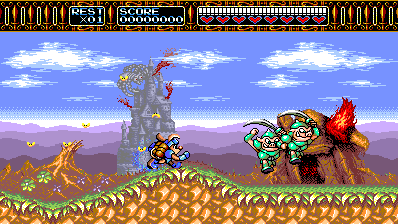 | 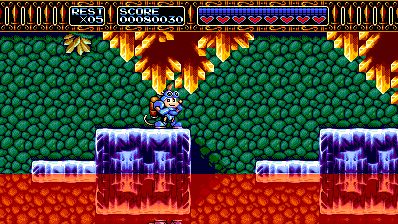 |
| Bridge boss | Minecart ride |
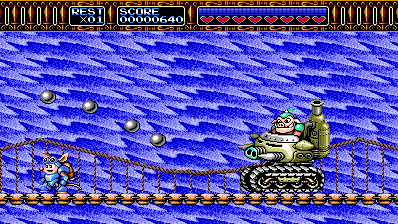 | 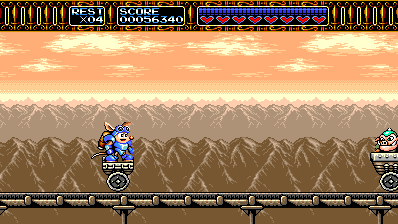 |
Captured from v0.1.13 with Adaptive (fit window) at 16:9 and Expanded Spawn Range. Adaptive follows the window when you resize it; the game pixels keep their proportions.
Features
- Adaptive widescreen: additional scenery and actors across all seven stages, including vehicle sections, boss arenas, and cutscenes. Fixed 16:9, 21:9, and 32:9 modes are also available.
- Rewind: browse snapshots of recent play and return to an earlier moment.
- Visual save states: nine slots with previews, plus direct slot shortcuts.
- Keyboard and controllers: simultaneous input and remappable bindings.
- Built-in mods: choose enemy activation timing and optionally enable Start Stage, Infinite Lives, Infinite Health, or Invincible.
Get started
| Platform | Download | Requirements |
|---|---|---|
| Windows x64 | ZIP | 64-bit Windows with working OpenGL |
| Linux x86_64 | AppImage | Ubuntu 24.04 or a compatible system; glibc 2.39 and working OpenGL |
SHA-256 checksums are available for both packages. Older Linux distributions and Steam Deck have not been validated.
- Extract the entire Windows ZIP into a writable folder, or place the Linux
AppImage in one and make it executable with
chmod +x. - Run
RKARecomp.exeor the AppImage and select your ROM in the launcher. - Launch the game. Widescreen starts on in Adaptive (fit window); resize the window to change the visible playfield.
- For the original 4:3 view or a fixed aspect ratio, open Mods > Widescreen in the launcher and turn it off or choose another mode.
The supported ROM is a raw USA cartridge dump: 1,048,576 bytes, CRC32
A6EFEC47. Other regions and modified ROMs are unsupported.
On Linux, use --appimage-extract-and-run if FUSE is unavailable. The ROM
picker uses zenity, kdialog, or yad; you can also place the ROM beside
the AppImage as rka.bin, or pass its path on the command line.
Settings and save states live beside the executable or AppImage. When
upgrading, preserve settings.ini, rka-video.ini, rom-RKA.cfg, and your
native_save_N.bin files. A saved Widescreen choice is kept: if an earlier
version saved it as off, turn it on under Mods > Widescreen.
Widescreen and enemy activation
Widescreen is on by default in Adaptive (fit window), which fits the current window; fixed 16:9, 21:9, and 32:9 modes are also available. The original playfield remains the minimum width, and the HUD counters stay centered. Some title, menu, and presentation screens retain the original centered picture. Turning the Widescreen mod off restores the original view and activation rules.
Mods > Widescreen > Enemy activation offers two choices:
- Expanded Spawn Range (default) brings enemies into the wider view earlier and keeps them active longer. This changes encounter timing and can put more enemies on screen. The castle fire corridor retains its original placement timing to avoid activating its linked effects early.
- Original Spawn Range keeps the original camera's activation timing. Enemies can visibly appear inside the wider view when they enter that range.
For a direct launch, pass the ROM and optionally a mode (fit, 16:9,
21:9, 32:9, or off for the original view):
RKARecomp.exe rka.bin --no-launcher --widescreen fit
Controls, saves, and rewind
Default game controls can be remapped in the launcher.
| Action | Keyboard | Xbox / PlayStation controller |
|---|---|---|
| Move | Arrow keys | D-pad or left stick |
| Jump (Genesis B) | X | A / Cross |
| Attack / charge rocket (Genesis A or C) | Z or C | B / Circle or X / Square |
| Start / pause | Enter | Start / Options |
| Tool | Keyboard | Controller |
|---|---|---|
| Save-state browser | F7 | Back/View + RB |
| Rewind browser | F8 | Back/View + right-stick click |
In either browser, use arrows or the D-pad to select, Enter / A to load or restore, and Esc / B to cancel. In the save-state browser, S / X saves into the selected slot. Browser button names refer to the Xbox layout.
Rewind needs a few seconds of play to build its history. Its depth and
snapshot interval are configurable in the launcher. Existing
native_save_N.bin files work in the visual browser.
Shift+F1–F9 saves to a slot. F1–F6 and F9 load directly; Ctrl+F7 and Ctrl+F8 load slots 7 and 8.
Known issues
Version 1.0 is the first stable release. It has been exercised across all 54 stage areas, all 41 authored intro, stage, and ending area IDs in long assisted 32:9 routes, and tester-provided saves from all seven stages, with automated renderer and Windows/Linux package checks. Some visual imperfections remain:
- A few arena and cutscene margins repeat or mirror background details, particularly in the later machine room and the Earth transition. Some boss artwork clips at arena edges.
- A flying boss can briefly show a thin propeller slice at the extreme screen edge as it enters the view.
- The attract demo can diverge from its recorded inputs, so Sparkster may die during the demonstration.
Reporting bugs
Open an issue
with the release version, operating system, stage, aspect ratio, enemy
activation setting, and steps to reproduce. A screenshot or short recording
helps with visual problems; a native_save_N.bin from just before the problem
is especially useful.
If generated, attach dispatch_misses.toml, interior_label_misses.toml,
floor_unsafe.toml, and floor_coverage.toml from the game folder. Please
do not attach your ROM.
Building from source
Clone with submodules, then place the supported ROM at game/rka.bin:
git clone --recurse-submodules https://github.com/mstan/RocketKnightAdventuresRecomp.git
cd RocketKnightAdventuresRecomp
Windows: install Visual Studio 2022 with C++ build tools, CMake, and Python 3.
cmake -S . -B build -G "Visual Studio 17 2022" -A x64
cmake --build build --config Release --target RKARecomp --parallel
./build/Release/RKARecomp.exe
Linux: install a C/C++ compiler, CMake, Python 3, pkg-config, SDL2
development headers, and OpenGL development libraries.
cmake -S . -B build -DCMAKE_BUILD_TYPE=Release
cmake --build build --target RKARecomp --parallel
./build/RKARecomp
CMake builds the recompiler and generates the game code from your ROM. See RELEASING.md for production builds and packaging.
How it works
The project recompiles the game's 68000 code to C and uses the shared segagenesisrecomp runtime for graphics, audio, and execution. Code not yet covered by static recompilation runs through the runtime's 68000 interpreter fallback; coverage reports help bring more of those routines into the generated code.
RKA's custom renderer reconstructs the wider scenery from the game's level layouts and live graphics data. The game-specific implementation and address notes are in game/CUSTOM-VIDEO.md. The launcher comes from recomp-ui, and the shared rbengine snapshot system supports rewind.
License and acknowledgments
For this project's code covered by the PolyForm Noncommercial License, PERMISSIONS.md grants standing permission for voluntary donations, sponsorships, and advertising revenue, including support for broader development initiatives. Payment must not buy access to the software, games built with it, or their updates, features, or game content, including early access.
Matthew Stanley has authority from the relevant copyright holders to grant these permissions for the project's PolyForm-covered code. Third-party components and code explicitly licensed under other terms retain those terms.
The port and framework use the
PolyForm Noncommercial 1.0.0 license. Third-party components
retain their own licenses; release packages include THIRD-PARTY-LICENSES.md
and a licenses/ directory.
Thanks to the shared framework contributors and the testers who supplied playthrough feedback, screenshots, and save states. Rocket Knight Adventures and its game artwork belong to Konami. This project is unofficial and is not affiliated with Konami or Sega.
Comentarios (0)
Inicia sesión para dejar un comentario.
Sé el primero en comentar sobre este juego.