Rally3D (ReRally3D)
Port nativo de Rally3D (ReRally3D) para PC.
Rally3D (ReRally3D)
Port nativo basado en su ficha de origen.
README del repositorio
Rally3D 2.0
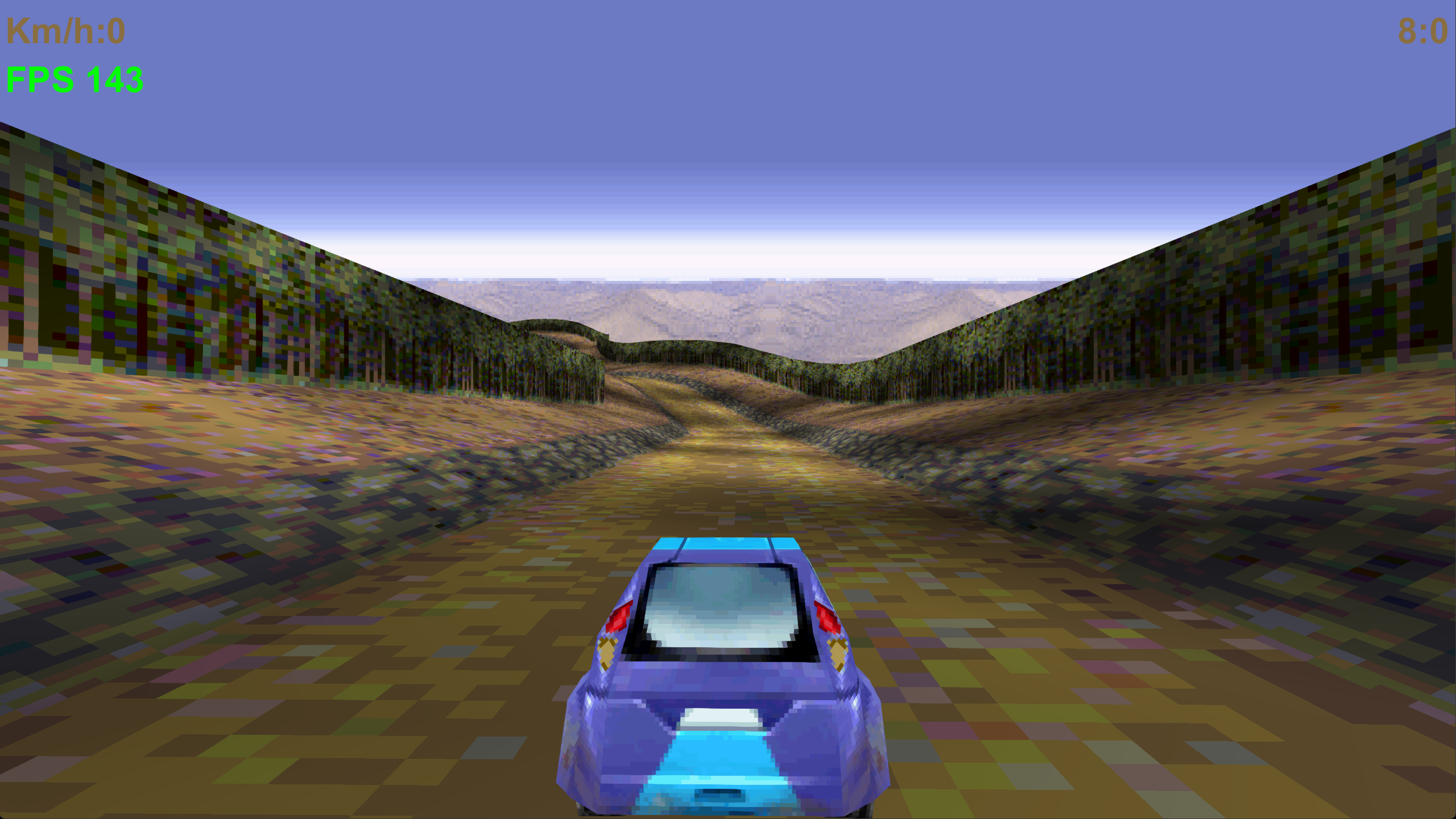
3D rally racing game for PC (Java 21, Windows) and Android (8.0+). Single player (Championship, Time Trial, Ghost Race), LAN multiplayer up to 32 players, add-ons (cars, skins, wheels, maps) and a built-in Map Editor.
Current version: 2.0-alpha65 (code 60). Alpha = built and compiled, not fully tested on every device.
Based on a J2ME (Nokia) rally game, ported to modern Java with its own software/GPU 3D engine (
javax.microedition.*compatibility layer on top of LWJGL on PC and GLES 3.0 on Android). Check the rights of the original assets insource/resbefore publishing or redistributing.
Contents
- MODDING-CHEATSHEET.md - short modding reference and INSTRUCTIONS.md - full modding guide: maps, cars, wheels, source
- Features
- Quick start
- Build
- Controls
- Game modes
- Settings reference
- LAN multiplayer
- Add-ons (modding)
- Map Editor
- Modifying the game (source)
- Saves, files, logs
- Project layout
- Versioning rules
- Troubleshooting
Features
- 12 tracks, 5 themes (summer, winter, desert, night, cup), 4 stock cars, medals and unlockables.
- Championship, Time Trial, Ghost Race (race against your own recorded ghost), LAN multiplayer.
- PC: GPU renderer (OpenGL via LWJGL, FXAA, optional GPU UI) or multi-core software renderer; gamepad support; mouse camera; telemetry HUD.
- Android: GLES 3.0 renderer, touch controls with editable button layout, finger camera, no storage permissions needed.
- Add-ons from zip files: cars (own 3D model + texture + stats), skins, wheels, maps. Enable/disable on the fly. Add-ons are sent automatically to other players in multiplayer.
- In-game Map Editor with pixel Painter, templates, test drive and fly view.
- In-game Car Builder: build your own car or wheels from boxes / wedges / prisms in a live 3D view, texture every part separately, export a ready add-on zip.
- Ghost Race with every car and every track (stock and custom), Championship with custom maps (own medals).
- In-game Instructions (main menu): the original pages plus pages for modes, ghosts, add-ons, Map Editor, Car Builder and modding.
- In-game log panel, crash/freeze diagnostics, safe (atomic) saving.
- Progress backup: Settings -> "Save progress to a file" / "Restore progress from a file" (one zip with progress, medals, best times, unlocked cars, ghosts, add-ons, settings and custom-map records), see Progress backup. On Android uninstalling the app deletes its data, so keep this zip.
- Add-ons are validated strictly (sizes, PNG headers, models, map sprites) because they can arrive from another player; a broken add-on is listed with a red error instead of crashing the game.
- Linux / macOS build script
build-linux.sh(PC jar + signed APK, no PowerShell). - Modding cheat sheet next to the full modding guide.
- Offline build: JDK and all tools are bundled, no Android SDK needed.
Quick start
PC (Windows):
- Build (see Build) or take a prebuilt
Rally3D-Java21-GPU.jar. - Run
run-gpu.bat. (It usestools\jdkif present, otherwisejavafrom PATH; needs JDK/JRE 21.)
Android:
- Build or take
Rally3D-Android.apk. - Copy to the phone, allow "install unknown apps", install, run.
- Updating over an installed copy only works if the APK is signed with the same key (
source/android-pkg/debug.jks).
Build
Windows, nothing to install if tools\jdk is present:
| Command | Result |
|---|---|
build-all.bat (or build-all.ps1) | Rally3D-Java21-GPU.jar + Rally3D-Android.apk |
compilepc.ps1 | PC jar only |
compileandroid.ps1 | APK only (signed with source\android-pkg\debug.jks, alias rally, password android) |
./build-linux.sh [apk|pc|all] | Linux / macOS: same result without PowerShell, see below |
Without the bundled JDK (a git clone has no tools/jdk, it is over 140 MB): install JDK 21 (e.g. Temurin) and put it in PATH, or unpack it into tools/jdk so that tools/jdk/bin/javac.exe exists. tools/env.ps1 picks the bundled JDK first, then the system one.
What the scripts do:
- PC:
javac --release 21onsource/game+source/pcwithsource/lib/*.jar(LWJGL 3.4.2), copiessource/resinto the jar, writes a manifest withMain-Class: rally3d.desktop.Mainand aClass-Pathtosource/lib/*. Keepsource/libnext to the jar. - Android (offline, no SDK):
javac -source 8onsource/game+source/androidagainsttools/android.jar(API 34 stubs) ->dx.jar->tools/ApkPack.javapacksclasses.dex+ resources + the precompiled manifest/arsc fromsource/android-pkg/prebuilt->apksignersigns (v2 + v3).
Editing the Android manifest: after changing source/android-pkg/AndroidManifest.xml the binary files in source/android-pkg/prebuilt (AndroidManifest.xml, resources.arsc, res) must be regenerated with a real aapt, otherwise the APK keeps the old manifest.
Linux / macOS: ./build-linux.sh apk builds and signs Rally3D-Android.apk exactly like compileandroid.ps1 (needs only JDK 21 in PATH; tested on Ubuntu 24.04). ./build-linux.sh pc builds Rally3D-Java21-GPU.jar, but source/lib has only Windows natives: to run the jar on Linux / macOS add lwjgl*-natives-linux / -macos jars of the same version (3.4.2) to source/lib first. ./build-linux.sh (or all) builds both. By hand (compile check / PC classes):
CP=$(ls source/lib/*.jar | grep -v natives | tr '\n' ':')
mkdir -p build/pc && javac --release 21 -nowarn -cp "$CP" -d build/pc $(find source/game source/pc -name '*.java')
cp -r source/res/* build/pc/
# manifest: Main-Class: rally3d.desktop.Main, Class-Path: all source/lib/*.jar (see compilepc.ps1)
Controls
PC keyboard
| Key | Action |
|---|---|
| Up / W | Accelerate (menu: up) |
| Down / S | Brake (menu: down) |
| Left / A, Right / D | Steer (menu: left/right) |
| Enter | Confirm / OK |
| Esc | Back / pause / menu |
| Space | Extra action key (original phone game key 12) |
| Tab | Scoreboard (multiplayer race; click toggles) |
| F1 | In-game log panel |
| F11 or Alt+Enter | Fullscreen (borderless) |
| Mouse | Orbit camera (setting Mouse camera), wheel = camera zoom |
0-9, * | Number keys of the original phone game |
Gamepad (PC, via GLFW)
Left stick = steer, RT = gas, LT = brake, right stick = camera, A = confirm.
Android
- Bottom left: steering arrows
<>. Bottom right: GAS and BRAKE pedals. Top: II (pause), LOG, TAB (multiplayer, hold). - Drag one finger on the free area of the screen = orbit camera (setting Mouse camera); quick double tap = camera back behind the car.
- Menus and lists scroll by finger (swipe + inertia).
- Button positions: Settings -> Touch buttons position (drag). DONE saves, RESET = default layout, CANCEL = discard. Size: Touch buttons size.
Spectating
After you finish a multiplayer race you watch the players still driving. PC: A / D (or arrows) switch player. Android: steering arrows. When the last player finishes, the results screen appears.
Game modes
| Mode | What it is |
|---|---|
| Championship | Tracks in order. Medals: bronze unlocks the next track; bronze on the first tracks unlocks Azure racer, silver Fast racer, gold on all tracks Good oldie. Enabled custom maps are listed after the 12 stock tracks. Progress can be saved and continued. |
| Time Trial | Race the clock on any unlocked track. Best times are stored per track. |
| Ghost Race | Race a recorded ghost of your best run (stored per track + car). Works with any car (stock or add-on) on any track (stock or custom map). After choosing your car you can pick the ghost of any car. |
| Multiplayer | LAN race, 2-32 players, see below. |
| Add-ons | Manage cars / wheels / maps packs. |
| Map Editor | Build your own track. |
Stock cars (top speed on the speedometer): Red danger 90, Azure racer 102, Fast racer 112, Good oldie 120 km/h. The speed ceiling comes from the car's stats in every mode, multiplayer included.
Entering the player name unlock in Settings unlocks all tracks and cars.
Settings reference
Main menu -> Settings. Items marked (PC) / (Android) exist only there. Settings are stored in settings.properties (PC) or the app data folder (Android).
General
| Setting | Meaning |
|---|---|
| Sound | Off / Low / Normal / Loud (MIDI music and effects). Default for new profiles: Loud. |
| Vibration | Device vibration. Shown only on devices that support it. |
| Auto acceleration | On = gas is held automatically, Off = you hold the gas key. |
| Speed units | km/h or mph on the HUD. |
| Player name | Shown in multiplayer, scoreboards and best-time tables (max 16 chars). |
| Touch buttons size (Android) | Slider for the on-screen button size. |
| Touch buttons position (Android) | Drag-and-drop layout editor for the 5 buttons. Stored as fractions of the screen. |
| Display / FPS | Submenu, see below. |
| Menu animations | Sliding menu transitions. Modified mode only. |
| Mouse camera | Camera orbits the car with mouse / finger drag. Modified mode only. |
| Telemetry HUD | Extra panel with race data on the HUD. Modified mode only. |
| Full function trace log | Writes every function call to rally3d-trace.log (huge file). Turn it on only to hunt a bug. |
| Language | Menus, HUD, help pages, Map Editor and Car Builder texts (English, Русский, Українська, Deutsch, Italiano, Français, Español; zh-CN / zh-TW files exist). Asked on the first launch. |
| Save progress to a file (backup) | Writes one zip with all your progress, see Progress backup. |
| Restore progress from a file | Reads such a zip back and applies it at once. |
| Game version: Modified / Vanilla | Vanilla = original game behaviour without the extras above (menu animations, mouse camera, telemetry, sprite-LOD tweak). |
Display / FPS
| Setting | Meaning |
|---|---|
| Resolution | Internal render resolution, 27 presets. Output is scaled to the window/screen. |
| Frame limit | 30...1000 FPS, Custom value..., or Unlimited (PC and Android). |
| Fullscreen window (borderless) (PC) | Borderless fullscreen, drawn above the Windows taskbar while the game has focus (Alt+Tab works normally). Also F11 / Alt+Enter. |
| FPS counter | Shows FPS. If FPS sits exactly on your monitor refresh rate with the limit off, the log warns that driver V-sync is forcing it (turn V-sync off for java.exe in the GPU control panel). |
| Anti-aliasing | Off / FXAA / FXAA Quality (FXAA 3.11 shader on GPU, CPU fallback otherwise). |
| 3D renderer | GPU (default) = OpenGL (PC) / GLES 3.0 (Android). Software (multi-core) = CPU raster, a fallback if the GPU path misbehaves. On repeated GPU failures the game switches to software by itself. |
| UI renderer (only with GPU 3D) | GPU = menus/HUD recorded and drawn by the GPU (default), CPU = drawn by the CPU and uploaded as a texture over the GPU world. If the GPU UI throws, the game falls back to CPU UI by itself (3D stays on the GPU). PC and Android. |
| CPU threads | Worker threads for the software raster and helpers. Auto = number of cores. |
| Dynamic resolution (Android) | Lowers the internal resolution when FPS drops. |
| V-sync (GPU only) | Sync to the display refresh. |
Settings file keys (settings.properties)
resolutionWH (1920x1080), fps, fpsLimit, fullscreen, showFps, vsync, antiAliasing (0-2), gpuRaster, gpuUi, gpuDefaultsVersion, cpuThreads (0 = auto), telemetry, vanillaMode, uiAnimations, mouseLook, noSpriteLod (true = no LOD frames on trees/bushes, sizes stay stable), calibrated. On the first launch the game picks the largest resolution preset that fits the screen and uses the refresh rate as the FPS cap.
LAN multiplayer
- Main menu -> Multiplayer -> Host or Join. Up to 32 players; host chooses max players and an optional server password.
- Ports: TCP 47832 (game), UDP 47833 (host beacon every 700 ms + discovery answers). Allow them in the firewall.
- Everyone must run the same version string (PC and Android can play together). The server list marks other versions as
[vX - INCOMPATIBLE]. - The phone needs the host's LAN IP (192.168.x.x / 10.x / 172.16-31.x), not a VPN address. The host's lobby lists the LAN address first. A direct IP can be typed in if discovery is filtered by the router.
- Car state is sent 20 times a second; TAB shows ping (RTT).
- Add-on cars, wheels and enabled maps of every player are transferred automatically (MD5-checked) before the race.
- Duplicate nicknames are made unique automatically.
Ghost Race
- Every (track, car) pair has its own best-run ghost:
ghosts/track-<track>-car-<carKey>.rplin the data folder (~/.rally3d/ghostson PC, app data folder on Android). <track>is0..11for stock tracks or the custom map id (>= 1000000, derived from map name + author, so the ghost survives re-exporting the map).<carKey>is0..3for stock cars or1000 + CRC32(name|author)for add-on cars (so the ghost survives editing the car zip and does not depend on the position of the car in the list).- The Select ghost menu lists the ghosts of all installed cars and ghosts whose car add-on is no longer installed (drawn with your own car model then). No ghost = free run, your run is still recorded.
- Ghost Race is also available in Vanilla mode.
- Old ghost files (format v1 / v2,
track-N.rpl) are still read; new ones are written as format v3 (adds the car name).
Championship on custom maps
- Ghost switch: the first item of the Championship track menu is Ghost: ON / OFF (tap / Enter toggles it, the menu stays open so you can switch it right while choosing the track). With ON, after you pick the car the Select ghost menu appears, your run is recorded and a faster run replaces the saved ghost of that track + car (same ghost files as Ghost Race). Resumed (continued) races have no ghost. The switch is not saved between game starts.
- Enabled custom maps are listed in the Championship track menu after the 12 stock tracks. They are never locked and do not unlock anything.
- They have their own medals (gold / silver / bronze), stored in
mapmedals.txtnext tomaprecords.txt(add-ons folder parent). Championship -> Reset all clears them too. - Medals are given like on stock tracks: you race against four reference times, finishing before the 3rd / 2nd / 1st reference time = bronze / silver / gold.
- Reference ("par") times of a custom map: set
par=60,66,75,86(4 ascending values in seconds) in the map'saddon.properties, otherwise they are estimated from the road length (segments * 3.9 / 4.3 / 4.9 / 5.7tenths of a second).
Add-ons (modding)
Main menu -> Add-ons. Three tabs: MAPS / CARS / WHEELS. Tap the green square = on/off, tap a row = details, red X = delete, + ZIP = import.
Folders:
- Windows:
%APPDATA%\Rally3D\addons\{maps,cars,wheels} - Linux/macOS:
~/.rally3d/addons - Android:
Android/data/com.rally3d.android/files/addons
A zip dropped in the wrong folder is sorted by its addon.properties automatically.
Car add-on zip
addon.properties
car.syn      # 3D model (optional)
car.png      # texture, power-of-two size (e.g. 128x128)
wheel.png    # optional
wheel.syn    # optional
addon.properties:
name=Red Rocket
author=you
description=optional text
base=3
speed=110
accel=1.6
steer=1.2
steerMax=1.1
grip=1.3
base = stock car 1..4 whose model and UV layout are used when car.syn is absent. speed / accel / steer / steerMax / grip = car stats (speed, acceleration, steering, max steering angle, grip); stock values are in RallyGame.statSpeed and CarDef. Compare with the examples (Red Rocket: 110 / 1.6 / 1.2 / 1.1 / 1.3, Slow Tank: 45 / 0.5 / 0.7 / 0.8 / 2.0). Do not put # comments on the same line as a value (.properties would read them as part of the value).
- Skin only: give only
car.pngwith the UV layout of thebasecar (seeexamples/example-test-skin-blue.zip). - Own model: convert an OBJ:
python tools/obj2syn.py model.obj car.syn. - Wheels:
type=wheels+wheel.pngand/orwheel.syn. Fits any of your cars, one wheels pack active at a time. Others see your wheels in multiplayer. - A PNG whose size is not a power of two is rejected with an error.
- Examples:
examples/*.zip(Red Rocket, Slow Tank, Gold Wheels, Test Blue skin, Test Lime wheels). - Short reference: MODDING-CHEATSHEET.md.
- Full step-by-step modding guide (cars, wheels, maps, themes, source code): INSTRUCTIONS.md.
Add-on limits and checks
Add-ons are untrusted input (another player can send you one), so every zip is checked when it is read, in the menu and on receiving it in multiplayer. A rejected add-on stays in the list with a red error text and is never loaded.
| What | Limit |
|---|---|
| zip | 64 MB, 64 files, 32 MB per file, 48 MB unpacked together |
car.png, wheel.png | width and height power of two, max 1024 |
car.syn, wheel.syn | valid header, vertices and indices, max 60000 indices |
track.bin | 4 + 20 x records bytes, at least 24 bytes |
map background.png, squares.png | PNG, max 1024 x 1024 |
map spriteN.png + spriteN.off | sheet PNG max 4096 x 4096, .off = 48 bytes, every frame must lie inside the sheet |
name, author, description | cut to 24 / 24 / 90 characters |
| enabled at once | 24 cars, 1 wheels pack |
| multiplayer transfer | MD5-checked; received packs and buffers together max 160 MB, otherwise the pack is refused and the race starts with stock parts |
Map add-on zip
Normally produced by the Map Editor (type=map): addon.properties, track.bin, optional background.png, squares.png (road atlas), spriteN.png/.off. Enabled maps are listed first in Time Trial, Ghost Race and Multiplayer, and after the 12 stock tracks in Championship (always unlocked, own medals, see Championship on custom maps). No practical zip size limit (safety ceiling 64 MB; one file inside a zip up to 32 MB).
Ghost Race works with every car (stock and add-on) on every track (stock and custom map), see Ghost Race.
Map Editor
Main menu -> Map Editor. Modes: PATH / HEIGHT / LAND / PROPS / MARKS / WORLD.
- Tap the ground = grow the road; drag the orange ball at the road end = stretch the road in any direction; yellow handles on the bottom strip = stretch/shrink the selected part.
- TEST = drive the map, FLY = free camera (W A S D / joystick), SAVE = write the add-on zip and enable it, Export zip = save a copy via file dialog.
- File menu: Save, Export zip, Test, Fly, Info, New blank, New from TEMPLATE, New from stock, Open, Help (8 pages), Exit.
- Templates: 7 tracks, 6 seamless backgrounds, 5 road surfaces.
- Road atlas = 8 tiles of 32x32: tile 0 plain road, tile 5 road with dashed centre line. Backgrounds tile horizontally.
- Painter: LINE / RECT / OVAL (SOLID toggle, brush, mirror), FLIP H/V, ROLL (seam check), MAKE SEAMLESS, RGB sliders + HEX colour, IMPORT PNG from
addons/import(sprites keep aspect, background is stretched, road = 256x32 atlas or one square tile). - Shortcuts (key-down only): Ctrl+Z / Ctrl+Y undo/redo, Ctrl+C/X/V/D copy/cut/paste/duplicate, Ctrl+A select all, Ctrl+S save, Ctrl+E export, Ctrl+T test, Ctrl+F fly, Ctrl+N new, Ctrl+O open, Del, arrows (+Shift extends), PgUp/PgDn, Home/End, 1-6 mode, Tab mode, F fit, +/- zoom, H help, Esc file menu. Painter: P E F I L R O M X, +/-.
- Touch (Android): PATH panel has COPY / CUT / PASTE / DUP / SELECT ALL buttons.
Car Builder
Main menu -> Car Builder. It is the car twin of the Map Editor: you build a car (or a set of wheels) from simple solids in a live 3D view, paint every part, and the game turns it into a normal add-on zip. No 3D program, no converter.
How a car is made
- A model is a list of up to 64 parts. A part is a box, a wedge (a box whose top rectangle is smaller or shifted: bonnet, windscreen, spoiler) or a prism (n-sided cylinder / cone: wheel arch, exhaust pipe, headlight).
- Every part has its own 16x16 texture (a material). Light is baked into it - top bright, sides medium, bottom dark - because the engine has no lighting. Switch it off with CAR page -> LIGHT BAKED: OFF for flat colours.
- Coordinates: +Z = front of the car, +Y = up, X = left/right. The ground is Y = 0; stock bodies start at Y = 0.5, are about 2.7 wide, 5.4 long and 1.5 tall.
- Output:
car.syn(mesh) +car.png(texture atlas: 128x128 for up to 16 parts, 256x256 for up to 64, one 32x32 tile per part) +car.rcm(the editable project; the game ignores it, the builder re-opens the car from it) +addon.properties(type=car/wheels,builder=1). Limit: 20000 triangles.
Screen layout
- Top bar: FILE, UNDO, REDO, SAVE, ? (help, 8 short pages).
- 3D view: drag = turn the camera, two fingers / right mouse button = move + zoom, wheel = zoom, tap a part = select it (yellow frame). Buttons + / - / RESET / SPIN / GRID / GUIDE (GUIDE draws a stock car or wheel next to your model for scale).
- Stretch handles: the selected part shows 6 square handles on its faces (red = X, green = Y, blue = Z). Drag one with mouse or finger to pull that face; the opposite face stays put (sizes snap to 0.05). Works in every tab and also on MIRROR parts.
- LOCK (button above the view, key
L): freezes the camera. Touching empty space does nothing (no turning, panning or pinch), only car parts and handles react: tap/touch a part = select it, drag a handle = stretch. Use + / - to zoom. Press LOCK again to unfreeze. - Bottom strip: one chip per part - tap to select.
- Four pages (tabs): PARTS, SHAPE, PAINT, CAR.
The four pages
| Page | What you do there |
|---|---|
| PARTS | + BOX, + WEDGE, + PRISM add a part; copy (Ctrl+D), delete (Del), rename; MIRROR keeps an identical part on the other side of the car (lights, mirrors, wheel arches - build one side only); HIDE removes a part from the car without deleting it. |
| SHAPE | Numbers of the selected part: X, Y (UP), Z (FRONT) position, WIDTH / HEIGHT / LENGTH, TOP WIDTH % / TOP LENGTH % (taper), TOP SHIFT X / TOP SHIFT Z (slant), for prisms AXIS, SIDES, END SIZE % (100 = cylinder, smaller = cone). Tap - / + to change a value by the chosen STEP (0.05 / 0.1 / 0.25 / 0.5), or tap the number to type it. DRAG X / Y / Z pushes the part along an axis by dragging in the 3D view; CENTER X and ON FLOOR snap it. |
| PAINT | Pick a colour from the palette (two slots: COLOR 1 and COLOR 2), tap the 16x16 grid to paint. Patterns fill a part with COLOR 1 / COLOR 2: SOLID, H-STRIPES, V-STRIPES, CHECKER, GRADIENT, CARBON, NOISE, FRAME, WINDOW. ALL PARTS = COLOR 1 paints the whole car. IMPORT PNG shrinks a picture from add-ons/import to 16x16. |
| CAR | Name, author, description, TYPE: CAR / WHEELS, base car (the stock car 1-4 whose stats are the starting point), the five stats (speed, accel, steer, steerMax, grip - same meaning as in addon.properties), LIGHT BAKED. |
FILE menu
| Item | Result |
|---|---|
| SAVE TO GAME | Writes the add-on into add-ons/cars (or wheels) and switches it on. It appears in Select car at once, no restart. Saving again replaces the previous version (same name + author). |
| EXPORT ZIP... | Writes the same zip anywhere (file dialog on PC, save dialog on Android) to share it. |
| NEW (TEMPLATE)... | Starts from SPORT COUPE, HATCHBACK, PICKUP, BLANK BLOCK, WHEELS STANDARD, WHEELS MONSTER or WHEELS SLIM. |
| OPEN INSTALLED... | Re-opens any add-on that was made with the builder (it has car.rcm). |
| HELP / EXIT | Exit asks to save when there are unsaved changes. |
Keys: Ctrl+Z / Ctrl+Y undo / redo, Ctrl+S save, Ctrl+E export, Ctrl+D copy part, Del delete, Tab next part, 1-4 pages, F reset view, H help.
Building wheels
FILE -> NEW -> WHEELS ... (or CAR page -> TYPE: WHEELS). Build one wheel: the game draws it four times and spins it around the X axis, so the axle must run along X and the wheel must be centred at Y = 0.54 (stock wheel radius 0.55). Use a prism with AXIS = X. The result is a type=wheels add-on that fits all your cars; one wheels pack is active at a time and other players see it in multiplayer.
Tips
- Build one half of the car and use MIRROR; a typical car is 15-30 parts.
- Leave wheel arches in the body (the game adds the wheels itself - do not model them into the body).
- Use a few big parts with a good pattern rather than many tiny ones: the 16x16 material of each part is stretched over it.
- Put the lowest point of the body at Y = 0.5 (the templates already do) or the car floats / sinks.
- Name + author are the identity of the car: do not rename an installed car if you want to keep its Ghost Race records (see Ghost Race). Cars made here work in multiplayer like any add-on car.
- For a hand-modelled car (Blender) use an OBJ and
tools/obj2syn.py, see INSTRUCTIONS.md.
Modifying the game (source)
| Want to change | Where |
|---|---|
| Game logic, menus, race rules | source/game/com/nokia/mid/appl/rally3d/RallyGame.java |
| Car stats / stock cars | CarDef.java, RallyGame.statSpeed, RallyGame.carDef |
| Max speed cap | RallyGame.updateRace (cap car.speed) |
| Sprite size (trees, bushes) | RoadSegmentMesh.SPRITE_SCALE (0.5), SPRITE_FULL_SIZE_DISTANCE (90) |
| Settings menu items | RallyGame.settingsMenu / desktopSettingsMenu / fpsSettingsMenu |
| PC window, input, settings file | source/pc/rally3d/desktop/ (GameWindow, Platform, KeyMap, GamepadSupport) |
| Android activity, touch buttons | source/android/rally3d/android/ (MainActivity, GameView) |
| 3D engine (software + GPU) | javax/microedition/m3g/Graphics3D.java (PC and Android copies), GpuSurface / GpuRenderer |
| 2D drawing layer | javax/microedition/lcdui/Graphics.java, UiRecorder.java |
| LAN protocol | TheBluetooth.java, AddonSync.java (changing it requires a version bump) |
| Add-ons | AddonPack, AddonManager, AddonUi, AddonSync |
| Ghosts (per track + car key) | GhostReplay, RallyGame.chooseGhost / finishGhostRecord / ghostKeyOf, Platform.loadGhost / saveGhost / ghostKeys |
| Custom maps: ids, records, Championship medals, par times | MapLibrary |
| In-game Instructions pages | HelpPages.java (extra pages), Texts.helpPages (original six) |
| Map Editor | MapEditor.java, MapTemplates.java, Painter.java, MapData.java |
| Saves | SaveData.java, javax/microedition/rms/RecordStore.java, rally3d/core/SafeFile.java |
| Texts / languages | Texts.java, Localization.java, source/res/lang.* (including zh-CN and zh-TW) |
| Tracks | source/res/tracks/trackNN.bin |
| Graphics / sounds | source/res/ (themes summer winter desert night cup, cars, midi, title) |
Rules when you touch code:
- After adding/changing functions or
catchblocks runpython tools/instrument.py(idempotent, updatesrally3d/core/FnTable.java). No emptycatchblocks. - Log problems with
RLog.e / RLog.w / RLog.i(tag, text); swallowed exceptions viaRLog.caught("Class.method", e). Never log every frame in hot loops. - Write player files only through
SafeFile.write(tmp -> fsync -> .bak -> rename). A broken file is renamed to.corrupt, never silently overwritten. - Do not add storage permissions to the Android manifest.
- Bump the version (see below).
Compile check without the scripts: javac over source/game + source/pc (classpath: source/lib jars without natives) for PC; javac -source 8 -bootclasspath tools/android.jar over source/game + source/android for Android.
More: GPU_MIGRATION.md (GPU pipeline plan and history), README.txt (detailed technical notes and per-version change log).
Saves, files, logs
| What | PC | Android |
|---|---|---|
| Settings | ~/.rally3d/settings.properties | app data folder |
| Progress, medals, best times, ghosts (RecordStore) | ~/.rally3d/rms/ | Android/data/com.rally3d.android/files |
| Add-ons | see Add-ons | .../files/addons |
| Logs | rally3d-N.log next to the jar (3 x 5 MB rotating) + rally3d-native.log from run-gpu.bat | .../files/rally3d.log (+ .1, .2), crash.txt, rally3d-trace.log |
Controllers (PC and Android). Xbox / PlayStation style pads work the same on both: left stick steers and moves in menus, triggers = gas / brake, right stick = camera, A / X / Start = confirm (A = ready in the lobby), B / Y / Select = back, bumpers = previous / next item, right stick click = scoreboard. On Android the pad is detected automatically (also when plugged in later).
Language. On the first launch the game asks for the language (English, Русский, Українська, Deutsch, Italiano, Français, Español; the system language is preselected). The choice is saved in settings.properties (language=) and can be changed any time in Settings > Language. Menus, HUD, help pages, Map Editor, Car Builder and add-on screens are translated; texts live in source/res/i18n/<code>.txt (English text TAB translation) and can be edited without recompiling the code. Code uses rally3d.core.Lang.t("English text"); a text without translation is shown in English.
Exporting the log (PC and Android). Open the in-game log (PC: F1; Android: LOG button or triple-tap the top-left corner) and press EXPORT in its top-right corner. A save dialog opens (Android: the system file picker, because Android/data/... cannot be opened without root); the whole log (all rotated parts, oldest first) is saved as rally3d-log-<date>.txt.
(~ = your user home folder; on Windows C:\Users\<name>\.)
- Reset everything: delete
~/.rally3d(PC) / clear app data or uninstall (Android). Also delete%APPDATA%\Rally3Dto remove add-ons. - Android: no storage permissions are used; uninstalling removes the data (except a possible Google Auto Backup,
allowBackup=true). Use Settings -> "Save progress to a file" before uninstalling and "Restore progress from a file" afterwards. - Logs contain your local paths: do not commit or post them unreviewed (
.gitignorealready excludes*.log). - In-game log: F1 on PC, LOG button on Android. Tap the top strip to change the filter (ALL / WARN+ERR / ERR), scroll with wheel / finger.
- Logged: start/env, lifecycle, menus, tracks/races/saves/multiplayer, Java crashes (stack + last calls + last keys), freezes (no frame > 2.5 s, UI hang > 3.5 s: thread dump), hitches (> 200 ms frame), slow functions,
perfevery 30 s (FPS, worst frame, memory, top functions), memory pressure, every caught exception.
Progress backup
Settings -> Save progress to a file (backup) writes rally3d-progress-YYYYMMDD-HHmm.zip (PC: save dialog, Android: system file picker, because Android/data/... cannot be opened without root). Restore progress from a file reads one back. Use it before uninstalling on Android (app data is deleted with the app) and to move your progress to another device.
| In the zip | Content |
|---|---|
base/rms/ | progress, medals, best times, unlocked cars |
base/ghosts/ | all ghosts |
base/addons/ | all add-on zips and enabled.txt (the real add-ons folder, also on Windows where it is %APPDATA%\Rally3D\addons) |
base/settings.properties | settings |
extra/ | custom-map records and medals (maprecords.txt, mapmedals.txt) |
- Restore writes every file of the backup over the current one (each write is atomic, the old file is kept as
.bak); files that are not in the backup are left alone. Add-ons and map records are re-read at once; restart the game to apply all settings. - Only known names are accepted (no
.., no other folders), at most 2000 files, 64 MB per file, 256 MB in total. Temporary files (.tmp,.part,.corrupt) and theexportfolder are not saved. - Fixed in 2.0-alpha65: on Windows the backup used to miss the add-ons.
Project layout
build-all.bat / .ps1       build PC + Android
build-linux.sh             build PC + Android on Linux / macOS (JDK 21)
compilepc.ps1              PC jar
compileandroid.ps1         APK
run-gpu.bat                run the PC jar (JVM flags: ZGC generational, heap tuned)
run-gpu-parity.bat         same + GPU/software parity check (debug)
examples/                  sample add-on zips
MODDING-CHEATSHEET.md      short modding reference
INSTRUCTIONS.md            full modding guide
tools/                     jdk (not in git), android.jar, dx.jar, apksigner, ApkPack.java,
                           instrument.py, obj2syn.py, env.ps1
source/game/               shared game code (PC + Android)
source/pc/                 PC platform layer (window, input, LWJGL GPU, lcdui/m3g/rms/media)
source/android/            Android platform layer (activity, GLES renderer, touch, lcdui/m3g/rms/media)
source/android-pkg/        manifest, icon, prebuilt binary manifest, debug.jks
source/res/                game resources (shared)
source/lib/                LWJGL 3.4.2 jars (+ Windows natives)
Versioning rules
Every change to the game (code, resources, manifest) must raise the version, because multiplayer lets only identical version strings play together.
Where (identical everywhere):
source/game/rally3d/core/Version.java:NAMEandCODE.source/android-pkg/AndroidManifest.xml:versionName=NAME,versionCode=CODE(always +1).- Binary
source/android-pkg/prebuilt/AndroidManifest.xmlmust match (regenerate withaapt). - "Current version" line in
README.txtand this file.
Suffixes: N.0 = checked and sure, N.0-beta = ran it, minor doubts, N.0-alpha = not fully run / risky edits. Polishing an alpha changes only the suffix (alpha2, beta, ...).
Troubleshooting
| Problem | Fix |
|---|---|
| FPS stuck at the monitor refresh (e.g. 60/144) with limit Unlimited | Driver V-sync override for java.exe (GPU control panel: Vertical sync = Off / use application setting). In-game V-sync = Off. |
| Black/odd image, low FPS on PC | Settings -> Display / FPS -> 3D renderer: Software, or update the GPU driver. After repeated GL errors the game falls back by itself (see log lines [gpu]). |
| Android: GPU renderer crashes at start | The game detects it (gpu.trying guard file) and switches to the CPU renderer on the next start. Re-enable in Settings -> Display / FPS. |
VERSION MISMATCH in log | Version.java and the manifest differ: fix both. |
| Cannot join a game | Different versions, firewall (TCP 47832 / UDP 47833), wrong IP (use the LAN address, not VPN), wrong password. |
| Add-on rejected | PNG size is not a power of two, bad addon.properties, zip over 64 MB. |
| APK does not install over an old one | Different signing key. Save progress to a file in the game first, uninstall, install, then restore it (or use the same debug.jks). |
No JDK found in build | tools\jdk is missing: install JDK 21 and add it to PATH, or unpack Temurin 21 into tools\jdk. |
| Build error after manifest edit | Regenerate source/android-pkg/prebuilt with aapt. |
Comentarios (0)
Inicia sesión para dejar un comentario.
Sé el primero en comentar sobre este juego.