

OutRun (CannonBall-SE)
Port nativo de OutRun (CannonBall-SE) para PC.
OutRun (CannonBall-SE)
Port nativo basado en su ficha de origen.
README del repositorio
CannonBall-SE
OutRun for your arcade cabinet or PC, with a real CRT arcade-monitor look. Add your MAME ROMs and play.
Works on Windows, Linux and Raspberry Pi, and is tuned for Pi-based cabinets. 60fps from a Pi 2 upwards (Pi 2 and Pi 3 need a mild overclock).
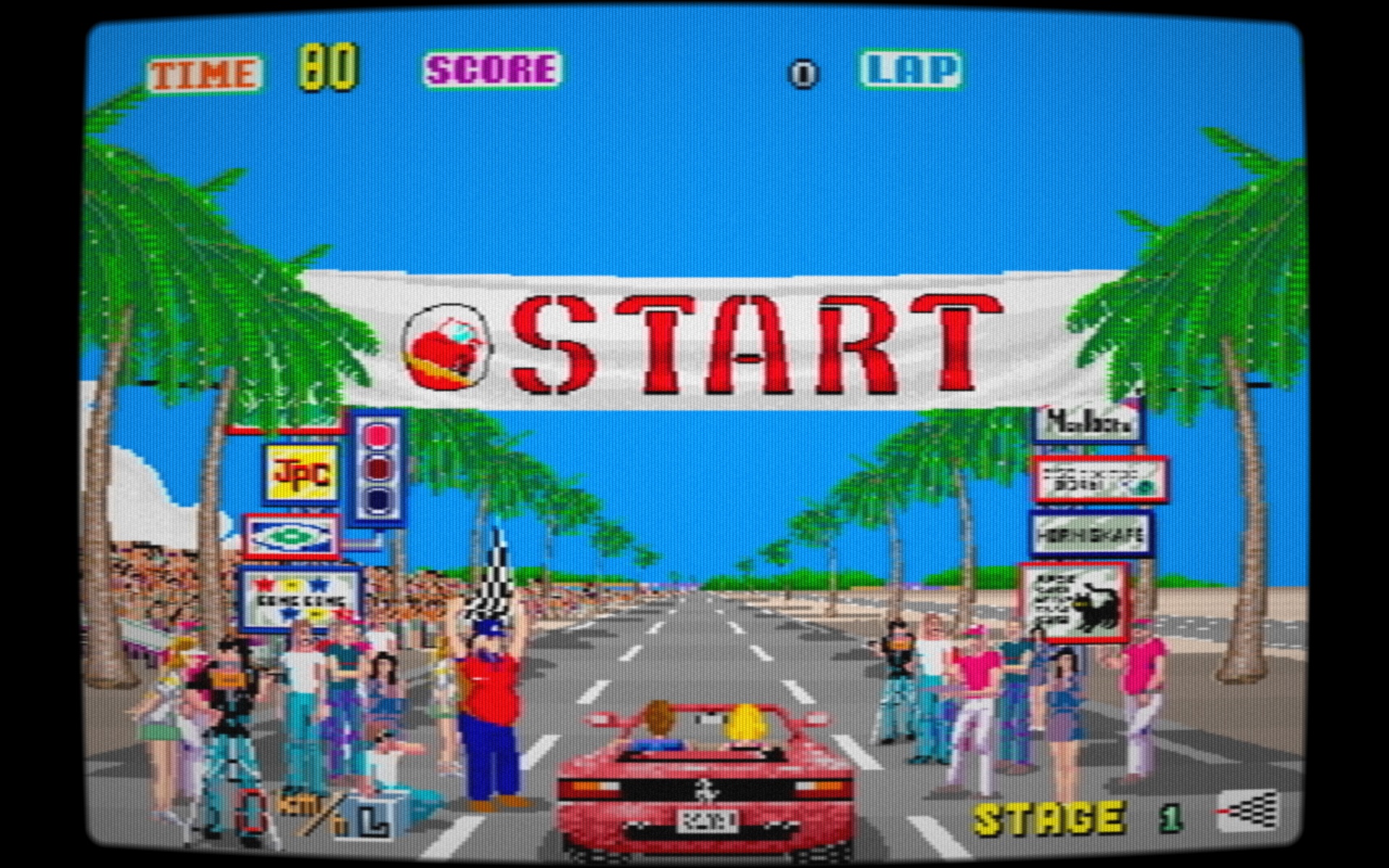
CannonBall-SE is a fork of Chris White's incredible OutRun engine, CannonBall.
Download for Windows · Raspberry Pi install · Report a bug
What you get
It looks like the arcade. On a modern screen OutRun's graphics end up as big, sharp blocks. SE softens the picture the way an old arcade monitor did, with curved glass, a slight glow and that warm colour you remember. Press F8 while playing to see the difference.
Easy to set up. Drop in your MAME outrun.zip and it finds it. Sound, steering wheel, pedals
and gamepad are all set up from the in-game menu, with no config files to edit.
Turn your Pi into an OutRun machine. Choose appliance mode during install and the Pi boots straight into the game, with its own startup and shutdown screens. Quit the game and the Pi shuts down. Switch it on and you're at the start line.
Smooth on small hardware. SE has been heavily tuned for older Raspberry Pi boards, and adapts automatically to keep the game running at full speed.
Sounds right. Music and effects play at the original arcade pitch, without stutters, even on low-powered boards. You can add your own MP3 tracks to the radio too.
Plays like the original, with correct sprite scaling and a few bugs fixed.
Made for cabinets. Wheels with force feedback and gamepad rumble work on Windows, Linux and Pi. SE also counts plays and running hours, and uses the system watchdog to restart the machine if it ever freezes.
Which CannonBall should I use?
CannonBall DX, a fork of SE, is aimed at Windows PCs with modern racing wheels and adds ultrawide support.
SE also runs on Windows, and is the one to pick for Linux or Raspberry Pi cabinets, where it runs at a full 60fps from a Pi 2 upwards.
Getting started
You'll need your own copy of the OutRun revision B ROMs. They aren't included. A MAME
outrun.zip is the easiest option; roms/roms.txt lists the individual files if
you have those instead.
Windows
Download the latest release, unzip it,
put outrun.zip in the same folder and run cannonball-se.exe.
Raspberry Pi
On Raspberry Pi OS (Bookworm or newer), open a terminal and paste:
curl -fsSL https://raw.githubusercontent.com/J1mbo/cannonball-se/master/bootstrap.sh | bash
The installer asks a couple of questions, including whether you want appliance mode, then gets on
with it. Reboot when it tells you to and copy your ROM zip into the roms folder. Installing takes
a few minutes on a Pi 4, or around 40 minutes on a Pi Zero.
Linux and building from source
See docs/INSTALL.md.
Which Raspberry Pi?
| Board | Runs at |
|---|---|
| Pi 4, Pi 5 | 60fps |
| Pi 2*, Pi 3*, Pi Zero 2 W* | 60fps |
| Pi 1, Pi Zero, Pi Zero W | 30fps |
* Pi 2/3/Zero2W need a mild overclock for 60fps. See docs/PERFORMANCE-TUNING.md.
Playing
C adds a coin, S starts. Steer with the arrow keys, A to accelerate, Z to brake. You can change any of these from the menu. docs/PLAYING.md covers the full controls, wheel setup and adding your own music.
More help
| Install | Windows, Linux and Raspberry Pi |
| Playing | Controls, wheels, custom music |
| Performance tuning | Getting the most from your board |
| Configuration | Every setting explained |
| Screen filters | How the arcade-monitor look works |
| Troubleshooting | Sound, controllers, video |
| Changelog | What's new in each release |
Built a cabinet with it?
Share a photo in Discussions! And if SE is running your cabinet, a star helps other builders find the project.
Licence and credits
Free to use and share, but not to sell. See docs/license.txt, docs/CannonBall-SE-license.txt and docs/THIRD-PARTY-NOTICES.md.
Based on CannonBall by Chris White. NTSC filter by Shay Green (Blargg). CannonBall-SE by James Pearce.
OutRun is a trademark of SEGA Corporation. This project is not affiliated with SEGA.
Comentarios (0)
Inicia sesión para dejar un comentario.
Sé el primero en comentar sobre este juego.