MinerVGA
Port nativo de MinerVGA para PC.
MinerVGA
Port nativo basado en su ficha de origen.
README del repositorio
MinerVGA for modern Windows
A source rebuild of MinerVGA 1.1 (1989, public domain, FrodoSoft / Harrell W. Stiles),
a QuickBASIC 4.0 DOS game, compiled with QB64 Phoenix Edition into a native Windows
program. The default layout is 16:9 (960×540, window scaled to an exact multiple) and shows
the whole 40-column mine and 20 rows at once; the original 640×480 layout is kept as
/classic.
| 16:9 (default) | /classic |
|---|---|
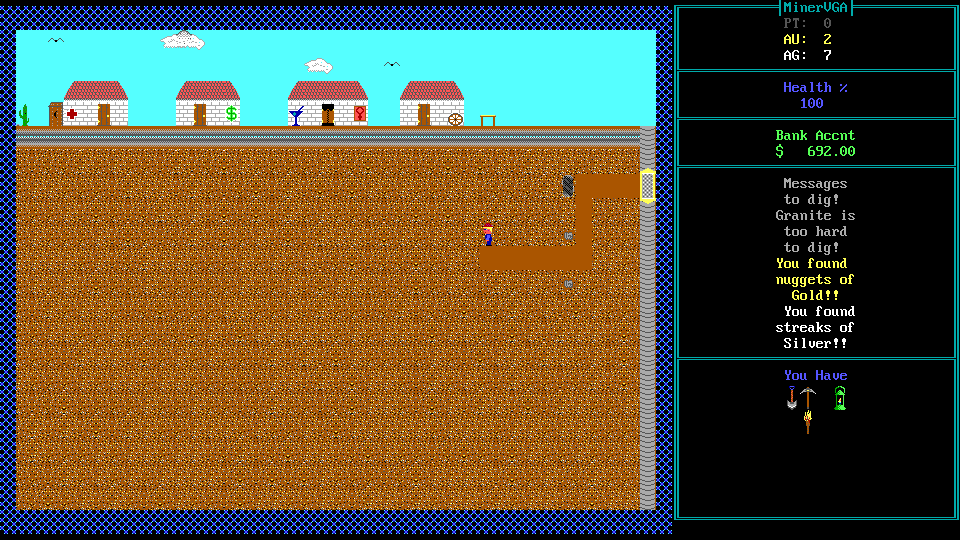 | 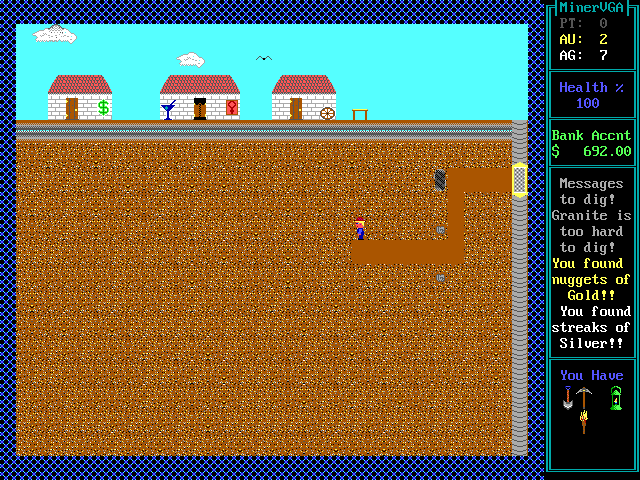 |
The original DOS files in this folder are untouched. No source code was ever released; the
BASIC in port/ was reconstructed from the executable (see docs/re-notes.md).
Download
Grab the latest MinerVGA-<version>-win64.zip from the Releases page,
unzip it anywhere and run MinerVGA.exe. Each zip has a .sha256 file beside it.
Build and run
Requirements: QB64-PE 4.6.0 (C:\Users\<you>\Tools\qb64pe\qb64pe.exe, or pass -Qb64).
.\build.ps1
dist\MinerVGA.exe            # 16:9: 960x540 canvas, 40x20 tiles
dist\MinerVGA.exe /classic   # original 640x480 layout, 32x18 tiles
build.ps1 copies MINERVGA.LBR and MINERVGA.DOC into dist\, and seeds MINERVGA.SAV /
MINERVGA.SCR from the original release only if they are missing (a rebuild never wipes saves
or high scores). Save files keep the original text format, so saves move between the DOS
original and the port.
Keys are those of the original (H in game): arrows move, E enter a building, T/B
elevator top/bottom, D drill, P pump, Y dynamite, Q sound, S save and quit,
R restore, X quit. Alt+Enter toggles fullscreen (integer-scaled).
Gamepad
Any XInput (Xbox-layout) controller works alongside the keyboard and can be plugged in at any time. PlayStation and other pads work through Steam Input or DS4Windows.
| Pad | Key | Action |
|---|---|---|
| D-pad / left stick | arrows | move (repeats while held) |
| A | E | enter a building |
| X / Y | D / P | drill / pump |
| RT | Y | dynamite |
| LB / RB | T / B | elevator top / bottom |
| Back (View) | H | help |
| Start | pause menu: resume, help, sound on/off, save and quit, restore, quit |
In a building, up/down moves a ► marker beside the options, A chooses and B leaves. On the help and full-screen screens any button continues. To type your name for the high-score table, choose a letter with up/down, add it with A (or right), delete with B (or left), and finish with Start.
What changed from the original
Gameplay, text, prices, random numbers and file formats are unchanged; original quirks are
kept and marked ' QUIRK: in the source. Port-only changes:
- 16:9 layout: all 40 columns visible (no left/right jump), 20 rows instead of 18, a wider HUD panel; building screens and full-screen scenes are centred. Vertical scrolling uses the original 10-row steps, clamped so the view never passes row 118.
- The title stays up for 3 seconds (it used to be visible while the sprite file loaded).
- Waiting for a key no longer spins the CPU; the win screen's fireworks are paced to the music.
ENDexits directly (as compiled QB 4.0 did) instead of QB64's "press any key".- Gamepad support (see above); the keyboard behaves exactly as before.
Layout
| Path | Contents |
|---|---|
port/ | Rebuilt source. MINERVGA.BAS (main program) includes the routine groups and platform.bi, the only layout-aware code |
docs/re-notes.md | Reverse-engineering ledger: memory map, runtime calls, routines, variables, formats, rules, quirks |
docs/porting-conventions.md | How the listing is translated (naming, platform replacements) |
re/ | Analysis pipeline: decompile.ps1 (EXEPACK removal, x87 fix, Ghidra listing/decompilation, DGROUP dump) and tools |
tools/package.ps1 | Zips dist\ into the release archive (used by CI) |
.github/workflows/build.yml | CI build and tag-triggered release |
tools/emu/capture.ps1 | Runs the original in DOSBox-X and saves reference screenshots |
Testing
The port has test hooks that drive it without a keyboard:
MINERVGA_SCRIPT: keys to feed ({L}{R}{U}{D}arrows,{CR}Enter,{PAD name}a gamepad button —UP DOWN LEFT RIGHT A B X Y LB RB RT START BACK—{SHOT name}savesname.pngnext to the EXE,{WAIT n}idles n frames); the program exits when the script ends. A real gamepad is ignored while a script runs.MINERVGA_TIME: pinsTIME$(12:00:30), hands out a sequence (12:00:30,12:00:34), or starts a running clock (12:00:30+). The mine and every dig roll are seeded from the clock.
$env:MINERVGA_TIME = '12:00:30'; $env:MINERVGA_SCRIPT = '  {SHOT town}'
dist\MinerVGA.exe /classic
Reference captures of the original:
& .\tools\emu\capture.ps1 -Name ref -Time 12:00:30 -Steps 'wait 3','key space','wait 2','shot town'
With the same clock, /classic screenshots of the help screen, the generated town and mine,
a restored save and two digging sequences match the original pixel for pixel.
Comentarios (0)
Inicia sesión para dejar un comentario.
Sé el primero en comentar sobre este juego.