
Empire Earth (ee-macos)
Port nativo de Empire Earth (ee-macos) para PC.
Empire Earth (ee-macos)
Port nativo basado en su ficha de origen.
README del repositorio
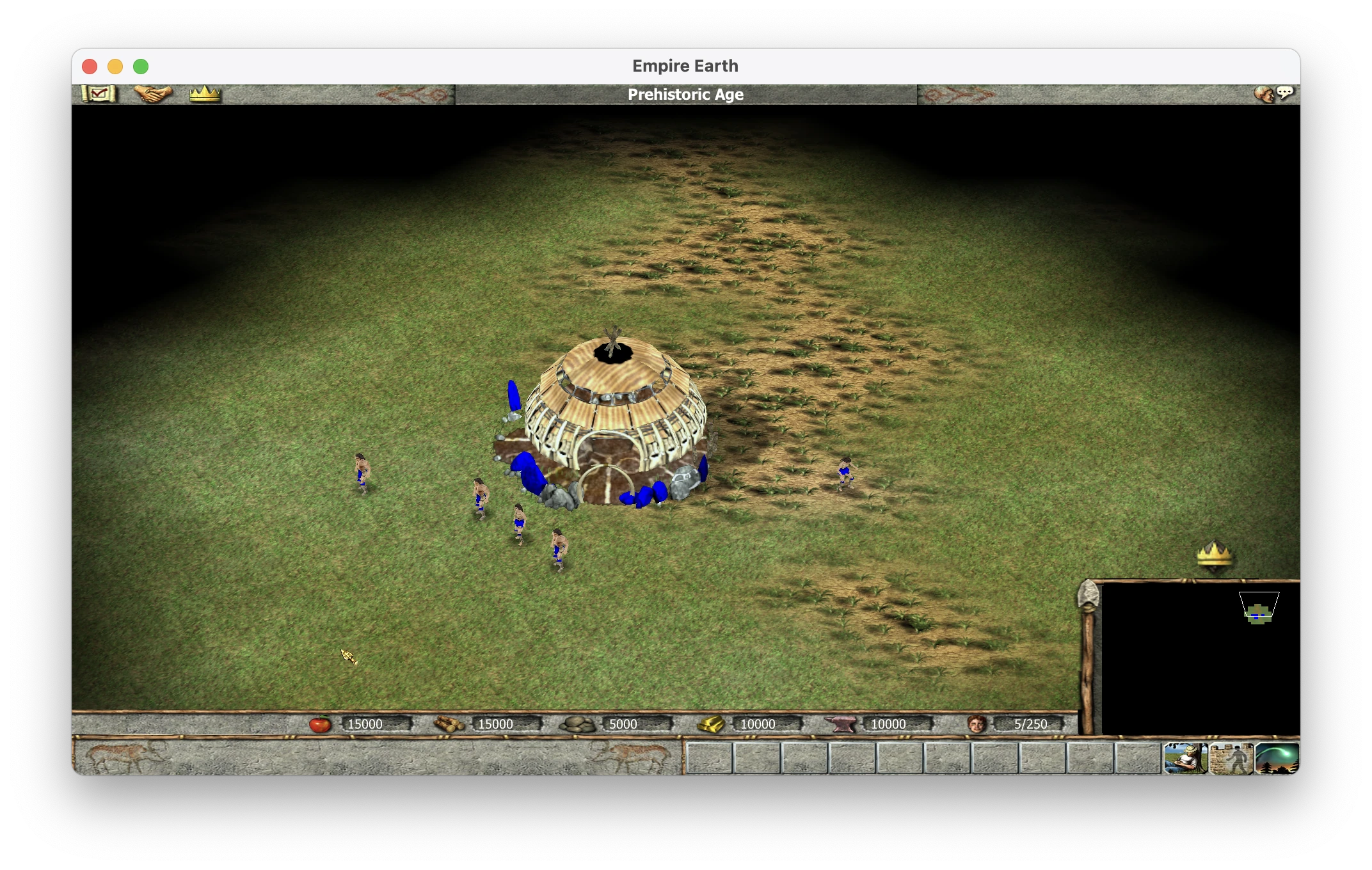
Empire Earth for Apple Silicon
Play the original Empire Earth (2001) natively on an Apple Silicon Mac, including LAN games against friends on Windows.
There's no Wine, no Rosetta and no emulator. On first start, the app takes your own GOG copy of Empire Earth Gold and recompiles the game's 32-bit x86 code into native arm64 code, on your Mac. It then runs that code on a small runtime that stands in for Windows and DirectX. The app contains none of the game.
Release 0.8.2, October 2026. Single player, saved games, music, movies and LAN multiplayer with unmodified Windows players all work. Release 0.7 passed its first test on a Mac that had never had developer tools: it installed from GOG's installer and played a 30-minute LAN game. Release 0.8 fixed what LAN evenings with friends turned up: slow scrolling, stutter in big battles and slow responses to clicks. Release 0.8.2 fixes a crash in the original game's own code when many units stand stacked on one spot. This is early software. Please try it and tell us what breaks.
What works
| In 0.8 | |
|---|---|
| Intro movies, menus, options | Works |
| Random-map games against the computer | Works. The simulation matches Windows tick for tick (see How we know it's right) |
| Scenario Editor | Works. The random maps it generates match Windows' byte for byte |
| Saved games | Works. Saves move between Mac and Windows in both directions |
| Music and sound | Works. All 8 DirectMusic tracks and the Miles sound effects play. The reverb is approximate |
| Graphics | Direct3D 7 on Metal, at up to 120 fps |
| LAN games with Windows (GOG) players | Works. The Mac can host or join |
| LAN games Mac↔Mac | Expected to work, not yet tested with two Macs |
| Internet games over ZeroTier | Expected to work, not yet tested end to end |
| Campaigns | Not yet verified |
| Direct Connect, Tailscale | Don't work with GOG copies (see Multiplayer) |
| The Art of Conquest expansion | Not supported. This port covers the base game only |
Play it
You need:
- a Mac with Apple Silicon (M1 or later) and macOS 13 Ventura or later;
- Empire Earth Gold from GOG. The 2001 CD, Steam and NeoEE editions are not supported;
- about 1.5 GB of free disk space for the first start, and 0.6 GB after that.
Steps:
- Download the installer from GOG. Go to Account → Games → Empire Earth Gold → Download offline backup game installers → Windows, English. Today that is one 667 MB file,
setup_empire_earth_gold_2.0.0.2974_gog_v3_(78415).exe. You don't need Windows to use it: the app unpacks it itself. - Install the app. Download
EmpireEarth-0.8.2.dmgfrom Releases, open it and drag EmpireEarth onto Applications. - Approve it once. The app isn't notarized by Apple, because that needs a paid developer account, so macOS blocks it the first time. Click Done, then go to System Settings → Privacy & Security and click Open Anyway. You only do this once.
- Give it your installer. The app checks every game file against GOG's release, then builds the game for your Mac. This takes 2–3 minutes on a recent Mac and up to about 10 on a base M1. It happens once; after that the app starts straight into the game.
- For multiplayer, click Allow when macOS asks whether EmpireEarth may find devices on your local network.
The full guide, with troubleshooting, where your files live and how to uninstall, is docs/INSTALL.md.
The app also accepts an installed Empire Earth Gold folder, or a Wine, CrossOver or Whisky copy of it. It only reads your files and writes only to ~/Library/Application Support/EmpireEarth/. It connects to nothing on the internet.
Each release lists the SHA-256 of its files in SHA256SUMS.
Multiplayer
Multiplayer uses the game's own LAN play, and Mac and Windows players can mix freely.
- Host or join from the game list: Multiplayer → Other Multiplayer. Either side can host.
- Everyone needs GOG's Empire Earth Gold. The game compares its files on join and refuses other versions. Everyone can use the same GOG CD key.
- Windows players: leave Network Adapter Options at its default. Choosing another adapter crashes the original game when the match starts.
- Over the internet, everyone joins one ZeroTier network, which is free and passes LAN broadcasts, so the game list works as on a LAN. Tailscale doesn't work: it carries no broadcasts, so the list stays empty.
- Direct Connect doesn't work with GOG copies, on Windows or on the Mac. It answers "Invalid CDKey" because the original game never accepts GOG's key there. Use the list.
How it works
Empire Earth is nine 32-bit Windows modules: a 4.2 MB EXE, the engine DLL, a C++ runtime library and six plugins (graphics, sound, networking, the random-map generator). The port treats them the way console recompilation projects such as N64Recomp treat ROMs:
your GOG installer or game folder
  │  import and verify: SHA-256 of all 294 files against GOG's release
  ▼
x86 machine code ──[function database: names and bounds, no code]──▶ generated C (~270 MB)
  │  translated on your Mac, never distributed
  ▼
bundled clang + ld64.lld ──▶ native arm64 code (~170 MB), cached
  │
  ▼
runtime: the 519 Windows functions the game imports, DirectDraw 7 / Direct3D 7,
DirectInput, DirectMusic, Miles, Bink, Winsock  →  SDL3, Metal, CoreAudio, BSD sockets
- Nothing from the game is in this repository or in the app. The repository holds a function database (names, addresses and sizes, never code bytes), file hashes and our own tools. The translated code is generated on each player's Mac from their own copy and stays there.
- No developer tools are needed. The 191 MB app bundles its own clang and lld (built from LLVM 23.1.3 as one 76 MB binary) and a trimmed Python. There is no Xcode, no Homebrew and no Ghidra on the player's Mac.
- Floating point is exact. Lockstep LAN play needs every machine's simulation to agree bit for bit, or the game's own out-of-sync check removes players. Empire Earth's maths is pure x87. We measured what it actually does on Windows: 53-bit precision, no extended-precision values in game code, and trigonometry from tables. We then checked the runtime's model against real Intel hardware on over a million test vectors and found no differences outside the transcendental instructions, which the simulation never uses (ADR-002).
- It's built on recomp-kit (MIT), which provides the translator, runtime and SDL3/Metal hosts. Our fork adds what Empire Earth needs: Direct3D 7 on Metal, exact x87, MSVC C++ exceptions, multi-module loading, msvcrt, Winsock, the GDI-drawn multiplayer lobby, DirectMusic (via a patched GothicKit/dmusic) and Miles sound.
Why not Wine? Wine on a Mac runs x86 code through Rosetta 2, and Apple is scaling Rosetta back after macOS 27. The multiplayer lobby also hung under the Wine build we tested. Translation keeps the original instruction semantics, and that is exactly what cross-play with Windows needs.
How we know it's right
A change is only accepted when a mechanical check against the real game on Windows passes. Review alone isn't enough. The reference is an unmodified GOG install on a Windows 11 PC, with a Windows VM as a second LAN peer, both instrumented with Frida.
- Random maps: the translated map generator matches the real DLL on Windows byte for byte in all 61 test cases. The cases cover 7 map scripts, 6 sizes, 5 seeds, 3 epochs and 3–8 players, for 549 calls in total.
- Single player: started with the same seed and settings, the Mac's simulation equals Windows' on all 48,330 simulation ticks of a 30-game-minute game. That includes the world checksum, the random-number state and every unit's position.
- LAN with Windows: the Mac hosted a 25.7-game-minute game for a Windows player and stayed in sync through five autosaves. All 9,362 of the game's sync checksums were equal on both machines, and its out-of-sync detector never fired.
- Saved games: a save made on either platform loads on the other and then plays out identically.
- No game bytes: the packaging check fails the build if the app contains anything derived from the game.
These checks catch bugs no playtest would. For example, the Mac's autosave once failed on a Win32 CreateFile corner case. Saving resets the computer player's strategy timer, so the Mac's computer player re-planned at a different tick than Windows'. A LAN game then went out of sync 16 seconds after the autosave. The single-player checksum stream pinned it to one tick (simparity.md §9).
How it's built: this is one developer working with AI coding agents (Claude Code), one on the Mac and one driving the Windows reference machine. That is why the bar for every change is a check against Windows rather than a review.
Roadmap
| Milestone | State | |
|---|---|---|
| M1 | The random-map generator runs natively, byte-identical to Windows | Done (phase2.md) |
| M2 | The game boots natively to the main menu; menus and options work | Done (phase3.md) |
| M3 | Single-player parity with Windows | Done for random maps and saves; campaigns not yet verified (phase4.md) |
| M4 | Mac↔Windows LAN games without out-of-sync | Done on a home network; ZeroTier and Mac↔Mac still to test (phase5.md) |
| M5 | An app anyone with the GOG game can install | Done: release 0.7 passed on a clean Mac (phase6.md); 0.8 is the performance release (performance.md). The app stays ad-hoc signed: no notarization |
| Next | Modernisation | Replace translated functions with readable C++, each checked against the original. First targets: widescreen and HiDPI UI, camera zoom, a native renderer. Perhaps later The Art of Conquest |
Get involved
Two kinds of help are most useful right now.
Play it and report. Reports are especially welcome from base M1/M2 Macs, macOS 13–14, games with three or more players and long late-game battles. Open an issue and attach game.log and launcher.log from ~/Library/Application Support/EmpireEarth/Logs/.
Test what hasn't been tested: Mac↔Mac games, games over ZeroTier, the campaigns, and 4–8-player LAN games.
If you write code, these are open:
- Tailscale support: mirror the lobby's UDP 8585 broadcasts to named peers by unicast, so the game list works without broadcasts (lansession.md §11).
- Music: calibrate the reverb against Windows recordings, and add a limiter, because four tracks clip at full music volume (audio.md).
- Modernisation: any translated function can be overridden by hand-written C++ and checked against the original (PLAN.md §5.7). The display plugin is a good start: about 500 functions with a fully named interface.
- Reverse engineering: verified function names and struct layouts for the function database (
db/).
Two rules for contributions:
- No game files in this repository, ever. Game binaries, assets, Ghidra databases and any C generated from game code stay in the git-ignored
original/,analysis/,build/andspikes/directories. - Every change to translated or reimplemented behaviour needs a mechanical check: a unit or differential test, a checksum stream, or byte-identical output compared with Windows.
docs/PLAN.md is the place to start. It has the plan, the decisions log and the architecture.
Build from source
You need an Apple Silicon Mac, the Xcode Command Line Tools, uv, LLVM clang and lld (brew install llvm lld) and your own GOG copy of the game. Ghidra is only needed to regenerate the function database.
git clone --recurse-submodules https://github.com/maxgraf96/ee-macos.git
cd ee-macos
uv venv --python 3.12 .venv
uv pip install --python .venv/bin/python -r kit/requirements-dev.txt
.venv/bin/python tools/setup.py --install "/path/to/Empire Earth"   # link your GOG copy, write the translation inputs (~15 s)
.venv/bin/python tools/run.py                                        # translate, build and open build/EmpireEarth.app
.venv/bin/python tools/test.py            # this repository's checks, then the kit's portable suites
.venv/bin/python tools/test.py --boot     # the whole game, booted headless to the main menu
.venv/bin/python tools/test.py --menus    # scripted input through the menus and into a game
.venv/bin/python tools/package_app.py     # the shareable EmpireEarth.app, its zip and DMG, in build/dist/
The game's network ports are fixed (UDP 33334, TCP 33335 and TCP 33336), so don't run game-backed tests while you're playing on the same Mac. The details are in docs/reference/build.md.
Repository layout
| Path | Contents |
|---|---|
kit/ | our fork of recomp-kit (submodule, branch ee): translator, runtime, hosts |
game.toml, globals.toml | the kit's game configuration: module hashes, the base map, translation inputs, curated symbols |
app/ | the Mac launcher with its first-run window, the game host's entry point, the DMG's Read Me |
db/ | the function database (names, addresses, sizes), GOG's file hashes, the Win32 import inventory, verified community symbols |
tools/ | setup.py/build.py/run.py/test.py (wrappers around the kit's); firstrun/ (the player's importer and build driver); inputs/ (translation inputs without Ghidra); package_app.py, stage_toolchain.py (the app and its toolchain); lan/, simparity/, parity/ (oracles and comparison tools); ghidra/ (the database pipeline) |
tests/, mods/ | test suites (boot, menus, lobby, LAN, M1 maps, x87, C++ exceptions, CRT) and the simulation tracer |
windows/ | scripts for the Windows reference machines: Frida hooks, captures, VM setup |
docs/ | the player's guide, plan, phase logs, decisions (ADRs), reference notes, research |
original/, analysis/, build/, spikes/ | git-ignored: your game files, analysis databases, build output, experiments |
Documentation
- INSTALL.md: the player's guide.
- PLAN.md: the goals, decisions, architecture, verification and risks.
- phase2.md to phase6.md: the work log for each milestone.
- decisions/: ADR-001 (why we forked recomp-kit) and ADR-002 (exact x87).
- reference/: deep dives on graphics, audio, netcode, the lobby, LAN sessions, simulation parity, the function database, the first run and packaging.
- research/: prior art and community reverse engineering.
Credits
- recomp-kit by veritr1x (MIT): the translator, runtime and hosts this port is built on.
- 00xJS/Empire-Earth: the Wine-based single-player route for the Mac, whose measured FPU modes, verified x87 hot functions and renderer notes helped from day one.
- GothicKit/dmusic (MIT): DirectMusic playback, with our patches.
- The Empire Earth modding and reverse-engineering community, including Reborn, EELibrary, the Cheat Engine table and SSA/CEM tool authors. We verified 240 of their facts against the GOG build; see community-re.md.
- The app ships with LLVM, SDL3, FFmpeg (LGPL, dynamically linked), innoextract, capstone, pefile, python-build-standalone and the GeneralUser GS SoundFont. Their licences are in the app's
THIRD_PARTY_NOTICES.txt.
Licence
This repository is under the MIT licence. The kit fork is MIT too, like upstream recomp-kit. The licence covers this project's own code and documentation, never Empire Earth itself (see the disclaimer below).
The third-party components in the app carry their own licences, listed in its THIRD_PARTY_NOTICES.txt. FFmpeg, which plays the game's Bink movies, is LGPL-2.1: its libraries are dynamically linked and replaceable, and every release carries the exact FFmpeg source they were built from.
Disclaimer
This is an unofficial fan project. It is not affiliated with, endorsed by or supported by Rebellion, Sierra, Stainless Steel Studios, GOG or Apple. Empire Earth and all related names and marks belong to their respective owners, and are used here only to identify the game this project works with.
This project contains no part of Empire Earth. Apart from the screenshot at the top of this page, which shows the game running through this port, neither this repository nor the app includes any of the game's code, data or assets, and no translated game code. To use it, you need your own legitimately purchased copy of Empire Earth Gold from GOG. The app reads that copy and builds the translated game on your own Mac. Do not share your imported game files or the built game, and do not use this project with copies you don't own.
No warranty. This software is provided "as is", without warranty of any kind, express or implied, including the warranties of merchantability, fitness for a particular purpose and non-infringement. It is pre-1.0 software: it may crash, lose saved games or behave differently from the original game. You use it at your own risk. In no event shall the authors or contributors be liable for any claim, damages or other liability arising from its use. Keep a copy of your saved games.
Not notarized. The app is ad-hoc signed and not notarized by Apple. Whether to allow it with Open Anyway is your decision.
Nothing here is legal advice. If you're unsure whether something is allowed where you live, check before you use it.
Comentarios (0)
Inicia sesión para dejar un comentario.
Sé el primero en comentar sobre este juego.