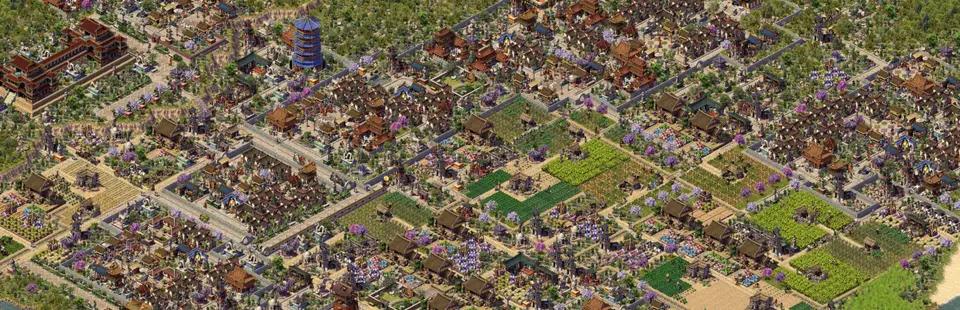

Emperor: Rise of the Middle Kingdom (OpenEmperor)
Port nativo de Emperor: Rise of the Middle Kingdom (OpenEmperor) para PC.
Emperor: Rise of the Middle Kingdom (OpenEmperor)
Port nativo basado en su ficha de origen.
README del repositorio
OpenEmperor
A clean-room reimplementation of Emperor: Rise of the Middle Kingdom for native macOS on Apple Silicon. 0.1.0-alpha.2 includes a playable city sandbox and an optional original-economy experiment. Gameplay and visual parity remain incomplete; original campaigns and savegames are unsupported.
You need your own installed or extracted Emperor game data. Original assets are read directly and are never bundled.
Build and run
Install Xcode Command Line Tools, CMake and OpenSSL 3. CMake fetches pinned SDL3 and JSON dependencies when needed and uses system zlib.
cmake -S . -B build -DCMAKE_BUILD_TYPE=Release -DCMAKE_OSX_ARCHITECTURES=arm64
cmake --build build --parallel
./build/openemperor
On first launch, select the Emperor data directory. Play Original economy opens the recommended experimental mode for a new city. Check the data folder, map, difficulty and paid starter or empty start before Start sandbox.
For a first city, choose Cities/Xia.map, Normal and Paid four-house starter, then press Space to run. This explicitly selects the existing Rule18 economy; its measured city still has five House fires. The player guide covers production, development, saving and the remaining limits.
Advanced / Legacy → N New Sandbox retains the classic sandbox profiles and their defaults; O/F/S/M/W/I/D/T/U retain the individual economy experiments. L Load Save continues an existing OpenEmperor save with its own rules. Saving or loading never upgrades an original-economy generation.
Controls
- Space pauses or resumes; . advances one paused tick.
- Arrow keys pan; the mouse wheel zooms; Z cycles 1×/2×/4×.
- F5 / F9 save and load; Escape returns to the menu.
- Help lists the current profile's tools and shortcuts.
Saves and settings normally live in
~/Library/Application Support/OpenEmperor/OpenEmperor/ on macOS.
See known issues for current limitations and documentation for gameplay, development, testing and packaging.
Comentarios (0)
Inicia sesión para dejar un comentario.
Sé el primero en comentar sobre este juego.