
Diablo II: Lord of Destruction (D2Decomp)
Port nativo de Diablo II: Lord of Destruction (D2Decomp) para PC.
Diablo II: Lord of Destruction (D2Decomp)
Port nativo basado en su ficha de origen.
README del repositorio

D2Decomp
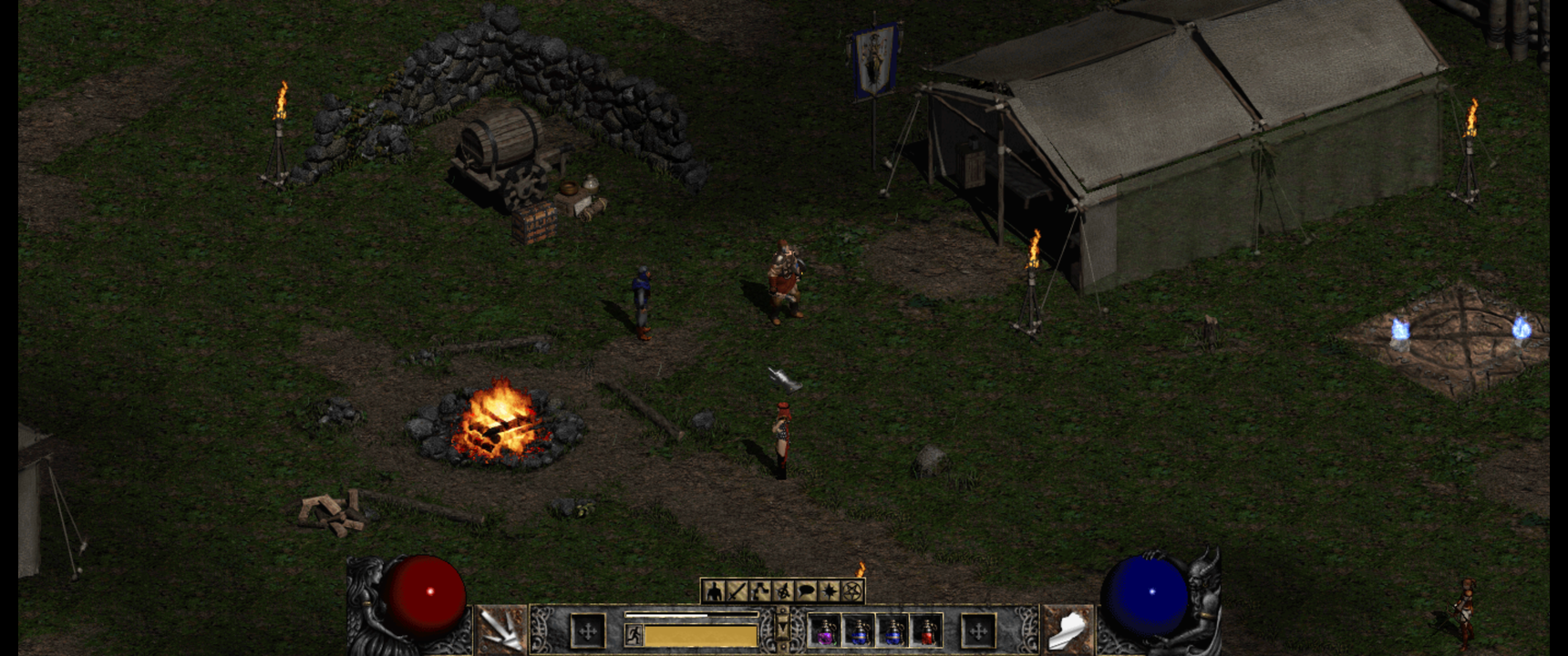
D2Decomp is a cross-platform, open-source reimplementation of the Diablo II: Lord of Destruction game engine. It aims to reproduce the original game's behavior, using version 1.14d as its reference. The long-term goal is a drop-in replacement, with optional features beyond the original game.
Why
I want to play Diablo II with my daughter, natively on Linux. No Wine, no emulation layer: a game engine that runs on our machines, reads the game data we own, and lets us adventure together.
What to expect
D2Decomp is an unfinished project—not the original game or a complete replacement. All five acts play through: character setup, the Rogue Encampment, Lut Gholein, the Kurast Docks, the Pandemonium Fortress and Harrogath, every area from the Blood Moor to the Worldstone Chamber, and all twenty-seven quests up to Baal's death. A classic game ends at Diablo; in Lord of Destruction, Tyrael's portal leads on to Act V. Nightmare and Hell populate their levels as the original does. d2d can also join a game hosted by the original game over TCP/IP, and plays with a gamepad as well as mouse and keyboard.
| Area | Progress |
|---|---|
| Launcher and asset formats | ✅ |
| Act I | ✅ 39 levels, 6 quests |
| Act II | ✅ 35 levels, 6 quests |
| Act III | ✅ 28 levels, 6 quests |
| Act IV | ✅ 6 levels, 3 quests |
| Act V | ✅ 28 levels, 6 quests; uber levels' monster groups not yet exact |
| Nightmare and Hell | ✅ |
| Single player, softcore and hardcore | ✅ |
| Gamepad (Xbox, PlayStation, Switch, Steam Deck) | ✅ remappable (apps/d2d) |
| Joining a game hosted by the original | 🚧 Acts I–IV checked live, Act V not yet |
| Sound | 🚧 3,416 of 3,520 base-install sounds covered (104 remain); 3,416 of the 3,423 the original plays, as traced (unit-sounds.md) |
| Multiplayer with a d2d host | Not started |
| Dedicated server | Not started |
Every ✅ act's maps, monster and object placement, drops and monster AI are checked against the original; the few details left are in the roadmap.
Bring your own game
You need your own Diablo II + Lord of Destruction game data. D2Decomp does not bundle Blizzard's game files or assets; it reads data from your installation or media. The project is not affiliated with or endorsed by Blizzard Entertainment. Legal notes explain how EU law allows reverse engineering for interoperability, and how the project stays within it.
How it works
Ghidra and Unicorn are the tools that make the reverse engineering possible. Ghidra helps us understand the original game's code; Unicorn runs original game functions so their behavior can be checked against this reimplementation.
Beyond the original game
Available now: Linux support alongside Windows and macOS, plus an optional
headless mode and local control channel for scripted play and testing, and
opt-in crash reports from the launcher (off by default; see
apps/README.md), and gamepad play.
Small comforts, each switchable off with --toggle: gold is picked up by
walking over it, roofs turn see-through around your character, lights reach
the screen's edges at any resolution, the world's sounds pause with the
game menu, and Configure Controls can put Attack and the right-hand skill on
a mouse's extra buttons.
Planned: let d2d host multiplayer games and run a dedicated server, and support high-DPI displays. These features are not implemented yet.
Steam Deck
Steam Deck support is experimental: there is no Flathub listing yet. The Deck's own controls work as a gamepad. In Desktop Mode:
- Download
d2decomped-x86_64.flatpakfrom the latest release. - Open it to install with Discover, or run
flatpak install --user ~/Downloads/d2decomped-x86_64.flatpak. - Exit Steam (Steam → Exit), start D2Decomp from the app menu and press Add to Steam: it adds D2Decomp to Steam's library with its artwork, so it launches from Gaming Mode. Pressing it again updates the entry instead of adding a second one, including one you added by hand.
Updates: flatpak install --user --reinstall --bundle d2decomped-x86_64.flatpak;
the Steam entry stays as it is.
You must provide your own Diablo II + Lord of Destruction data; point the launcher at it (a D2 install folder or the ISOs).
Text boxes (character name, TCP/IP address, chat) open Steam's on-screen keyboard in Gaming Mode; if one doesn't, press STEAM + X.
Build and run
You'll need a C++26 compiler, CMake 3.28+, Ninja, SDL3, OpenAL, zlib, libcurl and Qt 6.5+ for the launcher. The build fetches CLI11 and Sentry itself. On Linux and macOS it also builds a small Bink-only FFmpeg. StormLib comes from your system if it has one, or from source if not.
Debian / Ubuntu (CI uses Ubuntu 26.04; you need a release with libsdl3-dev,
which means Ubuntu 25.04+ or Debian 13+):
sudo apt-get install cmake ninja-build build-essential pkg-config libcurl4-openssl-dev \
  libsdl3-dev libopenal-dev zlib1g-dev libbz2-dev libstorm-dev qt6-base-dev libgl1-mesa-dev
macOS (Homebrew):
brew install cmake ninja sdl3 openal-soft qtbase stormlib
Windows: see the Windows steps in .github/workflows/ci.yml for the
prebuilt SDL3, OpenAL Soft and FFmpeg, plus zlib and StormLib from vcpkg.
Then build and run:
cmake -S . -B build -G Ninja
cmake --build build
build/apps/d2d/d2d --data /path/to/your/MPQ-folder
build/apps/d2d/d2d --join 192.168.1.10   # an original game's TCP/IP host, your LAN only
You can also join from the menus: Other Multiplayer → TCP/IP Game → Join
Game, type the host's address, then pick a character. d2d remembers the
address as last_tcp_ip in d2d.cfg. Alt+Enter switches between a window
and borderless fullscreen; fullscreen = 1 in d2d.cfg starts that way.
Widescreen is an opt-in quality-of-life improvement (--widescreen, or
widescreen = 1 in d2d.cfg): the in-game view widens to the window's aspect
(up to 1400 pixels wide, 600 high), revealing more of the world horizontally
while preserving the familiar 800×600 HUD and panel layout in the centre.
Menus and cinematics stay 800×600. The launcher has a Widescreen checkbox for
this setting. --view-width N pins the width (for scripts).
d2d looks for the game data in this order, and the first hit wins:
--data(or$D2_MPQ_DIR).- A
d2data.mpqbeside the binary or in the working directory. data =ind2d.cfg.
If the first hit is wrong, d2d stops with an error and doesn't try the
next one. The launcher (d2d-launcher) finds an installed Diablo II and writes data =
(and patch = for a non-1.14d install, pointing at LODPatch_114d.exe)
into d2d.cfg. That file lives in ~/Library/Preferences/d2d on macOS,
~/.config/d2d on Linux, and Documents\My Games\d2d on Windows.
Your install is read in place and never changed. Its Fullscreen,
Widescreen and Skip intro movies boxes set fullscreen =, widescreen = and
video =. Launch saves the
settings, starts d2d and closes the launcher.
Collaborate
Come and talk on the D2Decomp Discord: questions, playtests, bug reports, and what to work on next. New here? Start with CONTRIBUTING.md: with any AI agent you can contribute without being a programmer.
- Report a bug as a GitHub issue:
what you did, what you expected, the d2d version, and
d2d.log(in the settings folder: apps/d2d/README.md). A screenshot of the original game doing it differently helps most. - Send a change as a pull request against
main. CI builds Linux, macOS and Windows and runs the tests; CodeRabbit reviews it. - The original game is the reference. A behavior change says where in 1.14d it comes from (a function address, a table) and is checked against the original where it can be. The notes live in docs/research/re, the roadmap in docs/PLAN.md.
- No game files. Never commit data from the MPQs, the installer, or
game.exe; d2d reads them from your own install.
License
D2Decomp is licensed under the GNU General Public License, version 3 or later (GPL-3.0-or-later); the full text is in LICENSE.
Acknowledgments
Thanks to SophieLovesMorrowind for finding the Act III quest-state bounds crash and preparing the initial fix.
Thanks to CascaMori for extensive playtesting and reports leading to major fixes.
Comentarios (0)
Inicia sesión para dejar un comentario.
Sé el primero en comentar sobre este juego.